
WP Sheet Editor Media Library Premium Addon – Bulk Edit & Manage WordPress Media Files
Verified from VirusTotal 100% Original Product and Virus Free. Free New Version Lifetime On Single Purchase. Unlimited Website Usage Price is in US dollars and included tax
Buy confidently with secure digital checkout, account-based downloads, and a cleaner WPPlugShop product experience.
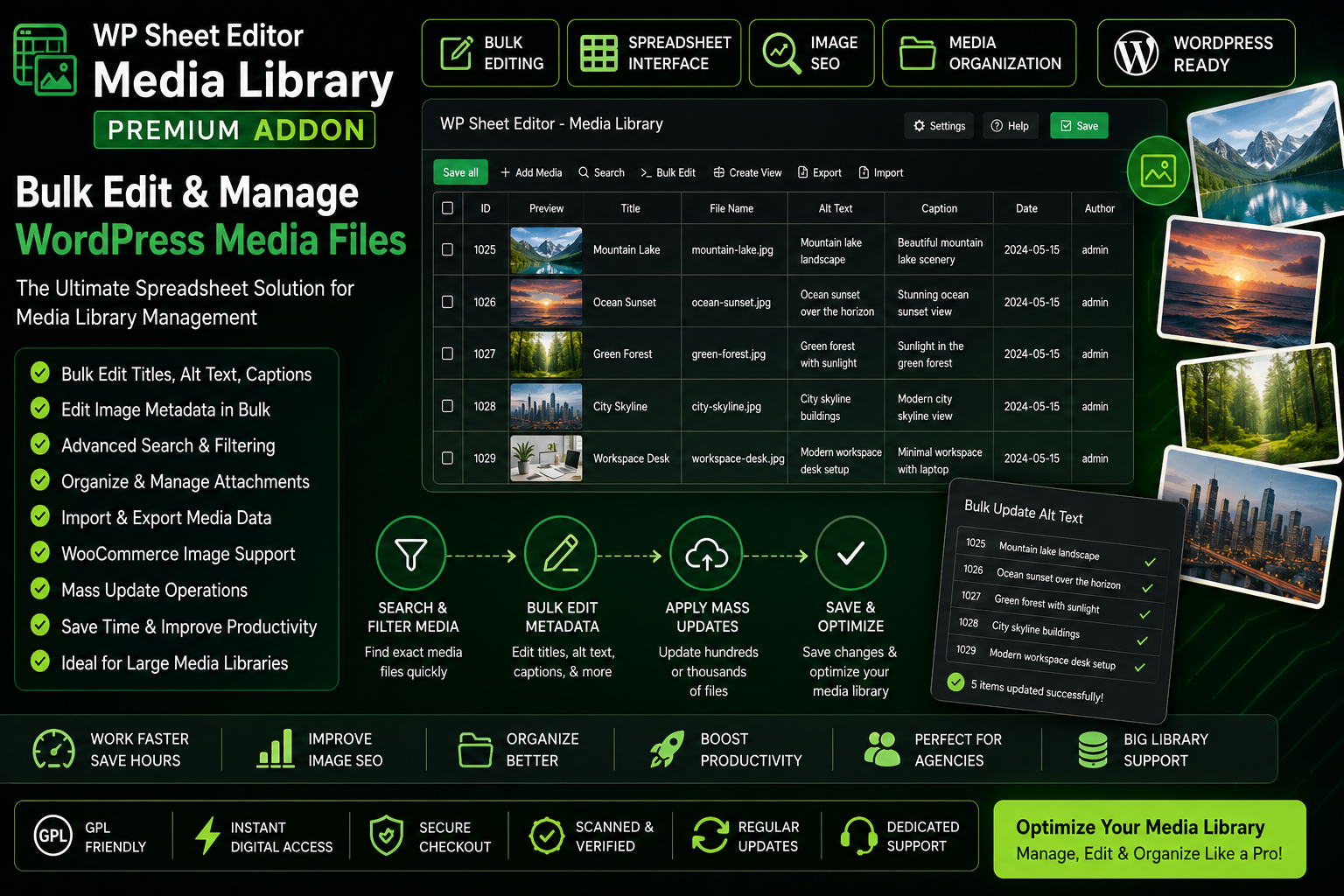
Preview WP Sheet Editor Media Library Premium Addon – Bulk Edit & Manage WordPress Media Files
View the product artwork, switch gallery images, and open a larger preview before checkout.
Get secure digital access for real WordPress projects
This section summarizes the buying experience and what customers can expect after checkout.
Product overview, benefits, and digital access details
Review the key product details, practical use cases, and digital access information before checkout.
Product Overview
WP Sheet Editor Media Library Premium Addon is a powerful WordPress media management solution that transforms the way you manage images, attachments, and media assets. Instead of editing files one by one through the default WordPress Media Library, this addon provides a spreadsheet-style interface that allows bulk editing, filtering, updating, and organizing thousands of media files from a single screen.
Whether you manage a WooCommerce store with thousands of product images, a content-rich blog, an agency website, or a large publishing platform, this addon helps streamline media management workflows while improving productivity and image SEO optimization.
Why This Product Is Useful
Managing large WordPress media libraries can become time-consuming as websites grow. Updating image titles, alt text, captions, descriptions, and attachment details individually often requires significant manual effort.
WP Sheet Editor Media Library Premium Addon solves this problem by providing a spreadsheet-based editing environment that makes it easy to perform bulk updates, organize media assets, improve image SEO, and maintain a clean, optimized media library.
- Bulk edit thousands of media files quickly.
- Update image SEO fields in minutes.
- Improve workflow efficiency for large websites.
- Manage WooCommerce product images more effectively.
- Reduce repetitive manual editing tasks.
- Organize media assets using advanced filtering tools.
- Maintain cleaner and more optimized media libraries.
- Save valuable time for agencies and content teams.
Key Features
- Spreadsheet-Style Media Editor for intuitive media management.
- Bulk Edit Media Files without opening individual attachment pages.
- Edit Image Titles directly from a centralized dashboard.
- Update Alt Text in Bulk for improved accessibility and SEO.
- Manage Image Captions and descriptions efficiently.
- Advanced Search & Filtering for locating media assets quickly.
- Bulk Metadata Updates across hundreds or thousands of files.
- WooCommerce Product Image Management support.
- Import & Export Capabilities for flexible workflows.
- Mass Editing Operations to save administrative time.
- Attachment Data Management for organized media libraries.
- SEO-Friendly Image Optimization Workflow.
- Large Media Library Support for growing websites.
Main Benefits
- Save Hours of Manual Work with bulk editing functionality.
- Improve Image SEO through efficient metadata management.
- Increase Team Productivity using spreadsheet-based workflows.
- Simplify WooCommerce Image Management for product catalogs.
- Organize Media Assets More Efficiently.
- Reduce Administrative Overhead for content-heavy websites.
- Manage Thousands of Images at Scale.
- Create Consistent Media Metadata Across Your Website.
Best Use Cases
- WooCommerce stores managing large product image catalogs.
- Blogs with extensive image libraries.
- Affiliate marketing websites.
- News and publishing platforms.
- Digital agencies handling multiple client sites.
- Educational websites with large media collections.
- Portfolio and gallery websites.
- Corporate websites with extensive digital assets.
- SEO-focused content marketing operations.
- High-traffic WordPress websites.
Who Should Use This Product?
- WooCommerce Store Owners
- WordPress Administrators
- SEO Professionals
- Marketing Agencies
- Content Publishers
- Affiliate Marketers
- Bloggers
- Web Developers
- Digital Asset Managers
- Business Owners Managing Large Websites
WP Plug Shop Access Benefits
WP Plug Shop provides access to professional WordPress-ready resources designed to help businesses, agencies, and website owners build more efficient workflows while managing their websites effectively.
- Instant Digital Access.
- GPL-Friendly Access.
- Secure Checkout Process.
- Scanned Digital Files.
- WordPress-Ready Resources.
- Suitable for Agency and Business Projects.
- Budget-Conscious Access to Premium Website Tools.
Product Details
| Attribute | Details |
|---|---|
| Product Name | WP Sheet Editor Media Library Premium Addon |
| Product Type | WordPress Media Management Addon |
| Primary Function | Bulk Media Editing & Library Management |
| Platform | WordPress |
| Spreadsheet Interface | Supported |
| Bulk Editing | Supported |
| Media Metadata Editing | Supported |
| WooCommerce Compatible | Yes |
| Image SEO Management | Supported |
| Ideal For | Media-Heavy Websites & WooCommerce Stores |
Feature Comparison
| Capability | WP Sheet Editor Media Library Premium Addon | Default WordPress Media Library |
|---|---|---|
| Bulk Media Editing | Advanced | Limited |
| Spreadsheet Interface | Included | Not Available |
| Bulk Alt Text Updates | Supported | Manual |
| Bulk Metadata Editing | Supported | Limited |
| Advanced Filtering | Included | Basic |
| Large Media Library Management | Optimized | Limited |
| WooCommerce Image Management | Supported | Basic |
| Workflow Efficiency | High | Moderate |
Pros and Considerations
| Pros | Considerations |
|---|---|
| Massively reduces media management time. | Requires WP Sheet Editor ecosystem compatibility. |
| Excellent for image SEO optimization workflows. | Advanced features may require initial setup. |
| Supports large-scale media libraries. | Feature availability may vary by version. |
| Ideal for WooCommerce product image management. | Large bulk operations should be performed carefully. |
| Spreadsheet editing improves productivity significantly. | Users should review changes before mass updates. |
Final Verdict
WP Sheet Editor Media Library Premium Addon is an excellent productivity solution for WordPress users who manage large media libraries and want a faster way to edit image metadata, organize attachments, and optimize media assets. Its spreadsheet-style interface simplifies complex media management tasks and helps reduce the time required to maintain growing websites.
For agencies, WooCommerce stores, publishers, SEO professionals, and content-heavy websites, this addon provides a scalable media management workflow that improves efficiency, enhances image SEO, and streamlines day-to-day website administration.
Quick product answers for buyers and AI search
Clear product answers help buyers, search engines, and AI answer engines understand this product faster.
Best ways to use this WordPress digital product
These use cases help buyers quickly decide if this product fits their workflow.
How digital access works
No physical shipping is required. This is a digital product access purchase designed for account-based downloads.
Secure payment options for digital checkout
WPPlugShop supports trusted checkout options so buyers can complete digital purchases with more confidence.
Frequently asked questions
Buyer-focused answers about digital access, secure payments, downloads, support, and product usage.
Related WordPress tools you may also like
Explore related WordPress tools that may support the same workflow, website type, or project goal.




Choose the right WordPress tool with confidence
Request a product, explore membership access, or contact support if you want help choosing the right WordPress digital product before checkout.