GymBase – Gym Fitness WordPress Theme for Fitness Centers & Personal Trainers
GymBase – Gym Fitness WordPress Theme for Fitness Centers & Personal Trainers
SKU:626075afe663
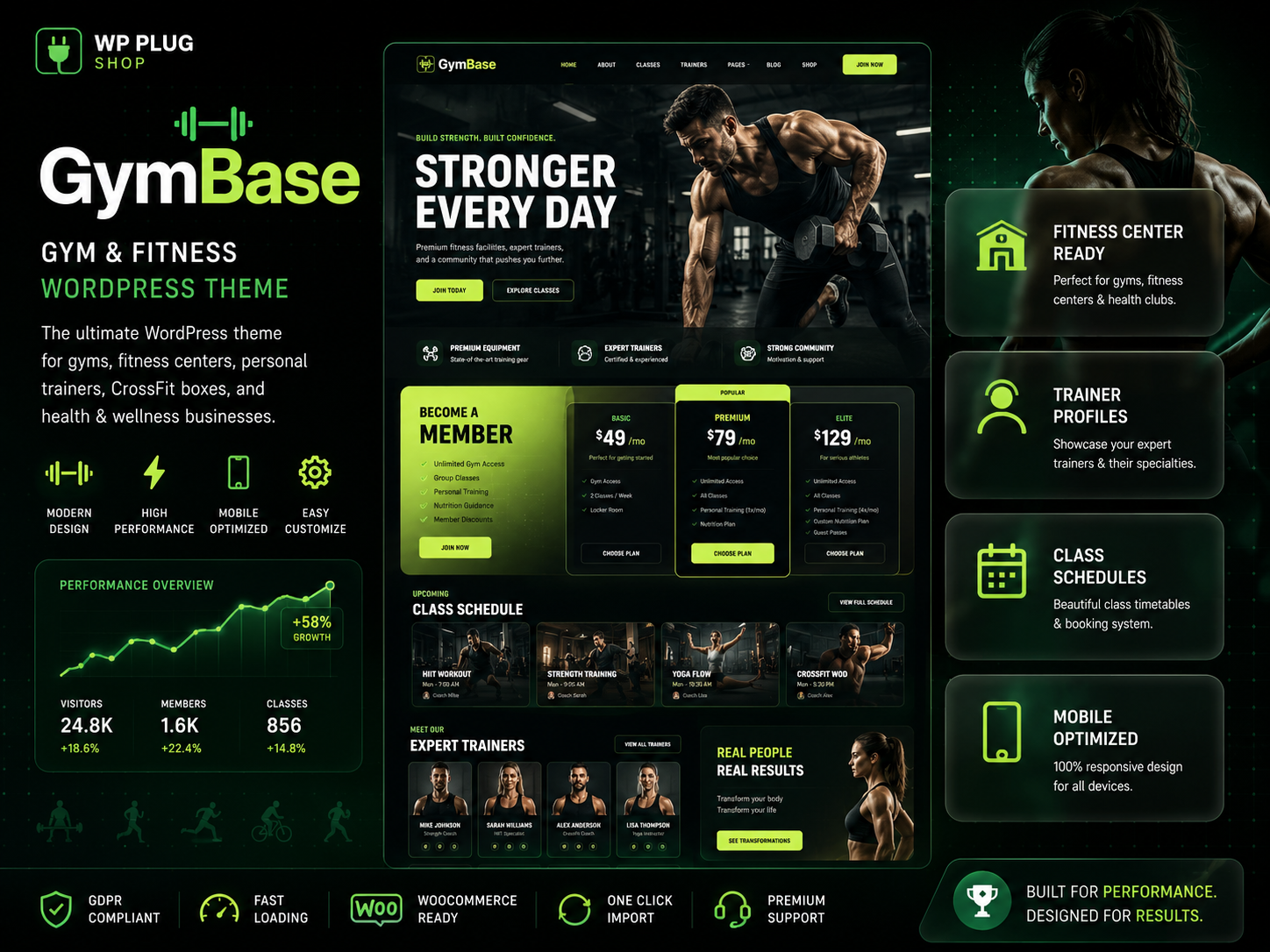
GymBase – Gym Fitness WordPress Theme is a professional fitness-focused WordPress theme created for gyms, fitness centers, personal trainers, health clubs, CrossFit
GymBase – Gym Fitness WordPress Theme is a professional fitness-focused WordPress theme created for gyms, fitness centers, personal trainers, health clubs, CrossFit facilities, wellness studios, sports centers, and fitness coaching businesses. Designed to help fitness professionals establish a strong online presence, GymBase combines modern design, class scheduling capabilities, trainer profile management, membership-focused layouts, and business-oriented functionality.
Whether you operate a local gym, personal training business, yoga studio, martial arts academy, or health club, GymBase provides the tools needed to showcase services, promote fitness programs, attract new members, and build credibility online.
The theme is built to support fitness businesses that want to present workout programs professionally, manage class schedules efficiently, and create a conversion-focused website experience for potential members and clients.
Why This Product Is Useful
Fitness businesses require more than a standard website. Potential clients often want to view training programs, class schedules, trainer credentials, membership options, and business information before making a decision. GymBase helps bridge this gap with fitness-specific website functionality.
Creates a professional online presence for gyms and trainers
Showcases fitness programs and services clearly
Displays class schedules and timetables efficiently
Highlights trainer expertise and credentials
Promotes memberships and coaching packages
Supports local fitness business marketing efforts
Provides a mobile-friendly user experience
Helps increase inquiries and member signups
Key Features
Fitness-focused homepage designs
Class timetable and schedule management
Trainer and instructor profile pages
Membership and pricing sections
Workout program showcase layouts
Health club and gym service pages
Responsive mobile-friendly design
Contact and inquiry forms
Testimonials and success story sections
Event and class management support
SEO-friendly website architecture
Blog functionality for fitness content marketing
One-click demo import capabilities
Business location and contact information support
Professional fitness branding elements
Main Benefits
Builds trust with professional fitness branding
Improves visibility of classes and services
Enhances member acquisition efforts
Supports local fitness marketing campaigns
Provides a better user experience for potential clients
Highlights trainer expertise and certifications
Creates a structured presentation for fitness programs
Works across desktop, tablet, and mobile devices
Best Use Cases
Commercial gyms
Fitness centers
Personal trainer websites
CrossFit facilities
Yoga studios
Pilates centers
Martial arts schools
Sports clubs
Athletic performance centers
Health and wellness businesses
Fitness coaching services
Group fitness programs
Who Should Use This Product?
Gym owners
Fitness center operators
Personal trainers
CrossFit coaches
Yoga instructors
Pilates studio owners
Martial arts academy operators
Fitness entrepreneurs
Sports club managers
Health and wellness professionals
Online fitness coaches
Fitness agencies building client websites
WP Plug Shop Access Benefits
WP Plug Shop offers WordPress-ready digital resources that help agencies, freelancers, business owners, and developers launch professional websites efficiently.
Instant digital access
WordPress-ready resource
Useful for agency and client projects
Budget-conscious website development solution
Suitable for professional fitness businesses
Secure digital download experience
Fast deployment for WordPress projects
Product Details
Feature
Details
Product Name
GymBase – Gym Fitness WordPress Theme
Theme Category
Fitness & Gym WordPress Theme
Primary Use
Gym, Fitness Center and Personal Trainer Websites
Industry Focus
Fitness, Wellness and Sports Businesses
Responsive Design
Mobile, Tablet and Desktop Friendly
Class Scheduling
Timetable and Schedule Management
Best For
Gyms, Trainers, Health Clubs and Wellness Centers
Feature Comparison
Capability
GymBase Theme
Generic Business Themes
Fitness-Focused Design
Purpose-Built for Fitness Businesses
General Business Layouts
Class Schedule Display
Fitness-Oriented Timetable Features
Requires Additional Customization
Trainer Profiles
Dedicated Trainer Showcase Pages
Standard Team Layouts
Membership Promotion
Fitness Membership Focused
Generic Pricing Sections
Workout Program Presentation
Optimized for Fitness Services
General Service Pages
Pros and Considerations
Pros
Considerations
Designed specifically for gyms and fitness businesses
Best suited for fitness-related industries
Supports trainer profiles and class schedules
Content preparation is required for launch
Professional membership-focused layouts
Advanced functionality may depend on setup preferences
Responsive and mobile-friendly design
Customization requirements vary by business model
Final Verdict
GymBase is a professional Gym Fitness WordPress Theme built specifically for fitness centers, gyms, personal trainers, health clubs, wellness businesses, and sports organizations. Its fitness-oriented design, trainer profile capabilities, class scheduling features, and membership-focused layouts make it a strong solution for businesses that want to attract new clients and improve their online presence.
For businesses searching for a gym WordPress theme, fitness center WordPress theme, personal trainer website template, CrossFit WordPress theme, or fitness coaching website solution, GymBase provides a professional foundation for building a modern and engaging fitness website.
Whether you are launching a new gym website, promoting personal training services, showcasing fitness classes, or building a complete wellness business platform, GymBase offers the flexibility and industry-focused design needed to create a strong digital presence.
Please note: This is a digital product. Due to its digital nature, all sales are final — no refund will be provided after purchase and delivery. Please see our Refund Policy before purchasing.
1 Reviews
Loading reviews...
Unable to load reviews. Please try again later.
Kevin DayRated 5 out of 5
1 day ago
Perfect for my project
Checkout was quick and the file was in my downloads immediately. Demo import worked perfectly and the layout looks great on mobile too.
907 Responsive Multi-Purpose WordPress Theme is a flexible and feature-rich WordPress website solution designed for businesses, agencies, freelancers, startups, online
The 907 Theme – Responsive Multi-Purpose WordPress Theme is a flexible and powerful website-building solution designed for users who want to create professional
A.I Autocontent for Elementor 1.0.0 is an AI-powered content generation plugin designed specifically for Elementor users who want to create website content faster and
A.I. AutoContent for Elementor is a groundbreaking extension that brings the power of artificial intelligence directly into your favorite page builder. Designed for
Aardvark – Community, Membership & BuddyPress WordPress Theme is a premium WordPress theme designed to help you build professional online communities, membership
Building an online community, membership portal, or secure corporate intranet using generic WordPress templates often leads to mismatched design aesthetics, severe
Original price:$150.00Price:
$3.99
Secure checkoutCards via Stripe — Apple Pay & Google Pay too
Instant deliveryDownload from your account right after payment
Lifetime updatesEvery new version, free — on a single purchase
100% original & cleanVerified virus-free, GPL licensed files