Product Overview
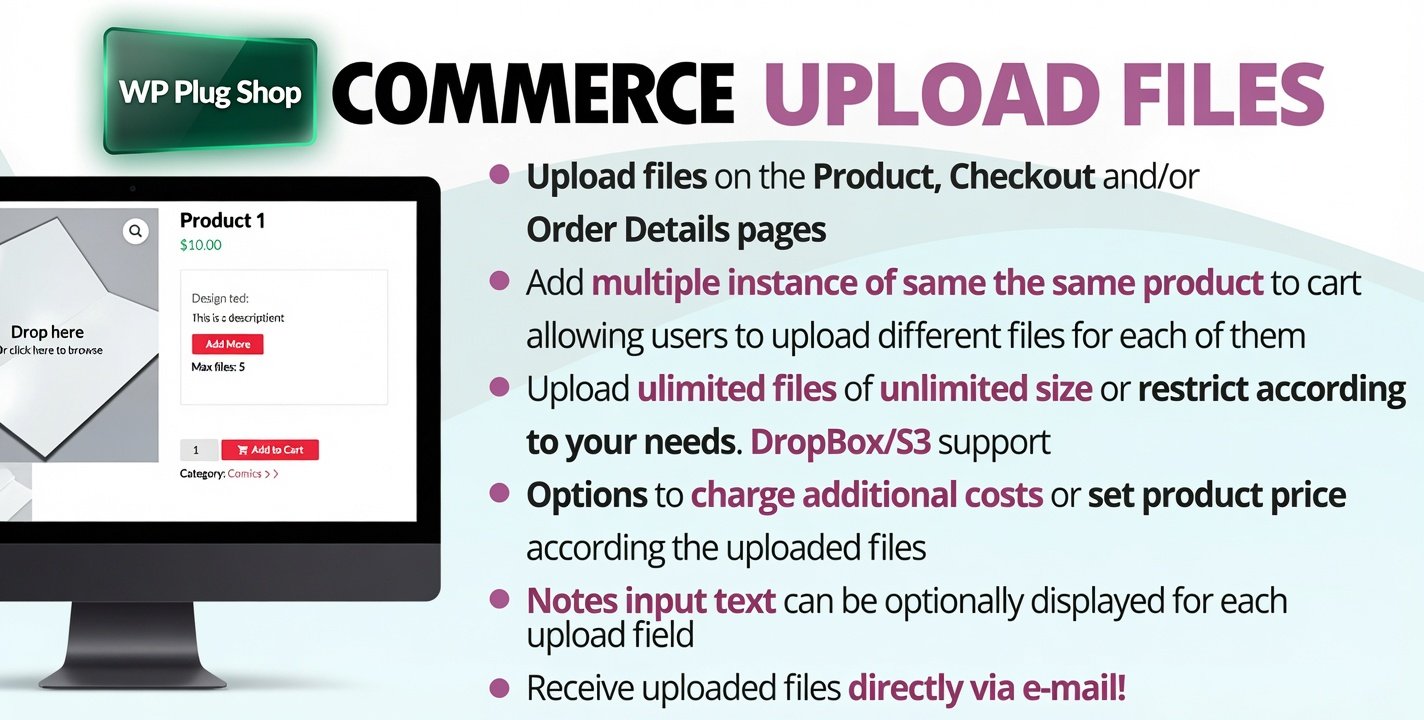
WooCommerce Upload Files 88.6 – Customer File Upload Plugin for WordPress & WooCommerce is a powerful WooCommerce extension that enables customers to upload files directly when purchasing products. Whether you need artwork, logos, images, documents, PDFs, or other design files, this plugin simplifies file collection by attaching uploads directly to WooCommerce orders.
Perfect for print shops, personalized product stores, engraving businesses, photo printing services, and custom manufacturing, the plugin streamlines order processing and improves communication between customers and store owners.
Why This Plugin Is Useful
Collecting customer files through email often leads to confusion, missing attachments, and delayed order processing.
WooCommerce Upload Files solves this problem by allowing customers to securely upload files before, during, or after checkout. Every uploaded file is linked to the corresponding WooCommerce order, making custom product fulfillment faster and more organized.
Key Features
- Allow customers to upload files with orders.
- Upload files before, during, or after checkout.
- Add upload fields to WooCommerce product pages.
- Attach uploaded files directly to orders.
- Support multiple file uploads.
- Configure accepted file types.
- Set maximum upload file sizes.
- Manage customer uploads from the admin dashboard.
- Secure file upload handling.
- Responsive upload interface.
- Flexible upload rules for products and orders.
- Improve custom order workflows.
- Compatible with WooCommerce.
- Easy WordPress configuration.
- Supports personalized product businesses.
Main Benefits
- Simplify custom product orders.
- Collect artwork and design files efficiently.
- Reduce back-and-forth email communication.
- Improve order accuracy.
- Speed up production workflows.
- Provide a better customer experience.
- Organize uploaded files automatically.
- Support personalized products.
- Increase operational efficiency.
- Enhance WooCommerce functionality.
Best Use Cases
- Custom T-shirt printing.
- Business card printing.
- Banner and signage companies.
- Logo and graphic design services.
- Personalized gift stores.
- Photo printing businesses.
- Engraving services.
- Print-on-demand stores.
- Promotional product suppliers.
- Custom packaging businesses.
Who Should Use This Plugin?
- WooCommerce store owners.
- Print shop businesses.
- Graphic designers.
- Digital agencies.
- Custom product manufacturers.
- Photography businesses.
- Marketing companies.
- WordPress developers.
- Small business owners.
- Anyone selling personalized products online.
WP Plug Shop Access Benefits
- Instant digital download after purchase.
- GPL-friendly WordPress resource.
- Secure plugin download experience.
- Files scanned before distribution.
- Affordable solution for WooCommerce stores.
- Suitable for businesses of all sizes.
- Ideal for custom product and print-on-demand websites.
Product Details
| Specification | Details |
|---|---|
| Product Name | WooCommerce Upload Files |
| Version | 88.6 |
| Product Type | WooCommerce Customer File Upload Plugin |
| Category | WooCommerce Extension |
| Compatibility | WordPress & WooCommerce |
| Main Function | Customer File Upload & Order Attachments |
| Multiple File Uploads | Supported |
| Best For | Custom Products, Printing Services & Personalized WooCommerce Stores |
Feature Comparison
| Feature | Standard WooCommerce | WooCommerce Upload Files |
|---|---|---|
| Customer File Uploads | No | Yes |
| Upload on Product Pages | No | Yes |
| Checkout File Upload | No | Yes |
| Multiple File Uploads | No | Yes |
| Order File Attachments | No | Yes |
| File Type Restrictions | No | Yes |
| Maximum File Size Control | No | Yes |
| Custom Product Workflow | Limited | Advanced |
Pros and Considerations
| Pros | Considerations |
|---|---|
| Collect customer files directly with orders. | Requires WooCommerce. |
| Supports multiple file uploads. | Requires initial configuration. |
| Improves order accuracy. | Storage requirements depend on uploaded file sizes. |
| Reduces manual communication. | File restrictions should be configured for security. |
| Ideal for personalized product businesses. | Advanced workflows may require additional WooCommerce extensions. |
Final Verdict
WooCommerce Upload Files 88.6 is an essential plugin for WooCommerce stores that sell custom, personalized, or made-to-order products. It allows customers to upload artwork, logos, documents, images, and other files directly with their orders, making production workflows faster, more organized, and less prone to errors.
If you want to simplify custom order management and provide a better purchasing experience, WooCommerce Upload Files is a reliable solution for modern WooCommerce businesses.
Frequently Asked Questions
What is WooCommerce Upload Files?
WooCommerce Upload Files is a WordPress plugin that allows customers to upload files such as images, artwork, logos, PDFs, and documents before, during, or after placing an order in your WooCommerce store.
Does this plugin require WooCommerce?
Yes. WooCommerce Upload Files is designed specifically for WooCommerce and requires the WooCommerce plugin to be installed and activated.
What types of files can customers upload?
Store owners can configure the plugin to accept various file formats, including images, PDFs, documents, ZIP archives, and other supported file types based on their business requirements.
Can customers upload multiple files for a single order?
Yes. The plugin supports multiple file uploads, allowing customers to submit several files for customized products or complex orders.
Can files be uploaded before, during, or after checkout?
Yes. Depending on your configuration, customers can upload files on product pages, during checkout, or after placing an order, providing flexibility for different business workflows.
Are uploaded files attached to WooCommerce orders?
Yes. Uploaded files are linked to their corresponding WooCommerce orders, making it easy for store administrators to access customer files during order processing.
Can I restrict file types and upload sizes?
Yes. The plugin allows administrators to define accepted file formats and maximum upload sizes to improve security and ensure customers upload appropriate files.
Is WooCommerce Upload Files mobile-friendly?
Yes. The plugin is designed with responsive functionality, allowing customers to upload files from desktop computers, tablets, and mobile devices.
Who should use WooCommerce Upload Files?
This plugin is ideal for print shops, personalized gift stores, engraving businesses, photo printing services, graphic design agencies, promotional product suppliers, and any WooCommerce store that requires customer file submissions.
Does this plugin require coding knowledge?
No. Most settings can be configured directly from the WordPress admin dashboard, making it suitable for beginners as well as experienced WooCommerce store owners.
Why download WooCommerce Upload Files from WP Plug Shop?
WP Plug Shop provides secure digital access to premium WordPress plugins and WooCommerce extensions for developers, agencies, and online store owners who need reliable solutions for custom product orders and customer file management.
Please note: This is a digital product. Due to its digital nature, all sales are final — no refund will be provided after purchase and delivery. Please see our Refund Policy before purchasing.