
WPShapere – WordPress Admin Theme & White Label Dashboard Customization Plugin
Verified from VirusTotal 100% Original Product and Virus Free. Free New Version Lifetime On Single Purchase. Unlimited Website Usage Price is in US dollars and included tax
Buy confidently with secure digital checkout, account-based downloads, and a cleaner WPPlugShop product experience.
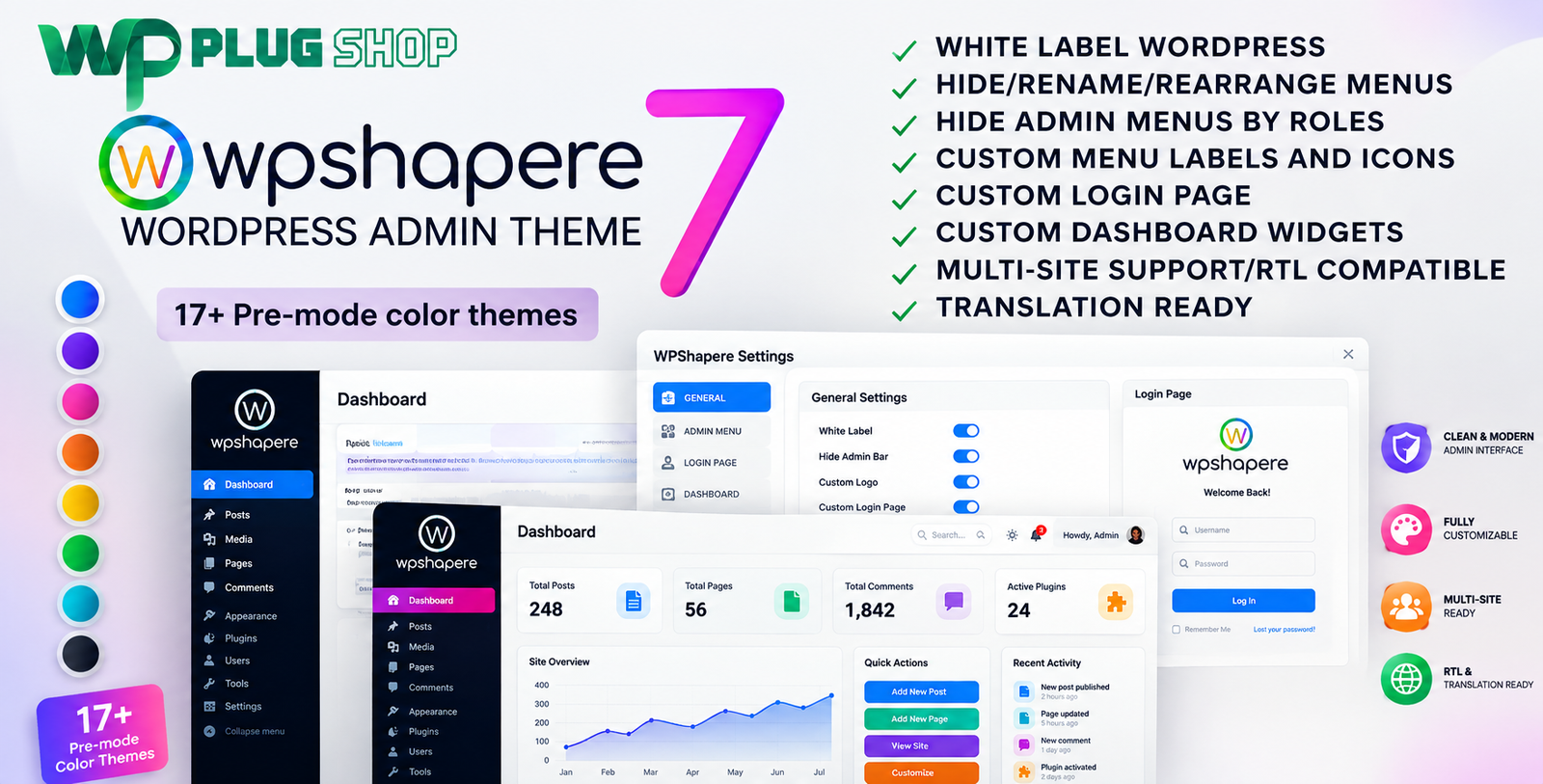
Preview WPShapere – WordPress Admin Theme & White Label Dashboard Customization Plugin
View the product artwork, switch gallery images, and open a larger preview before checkout.
Get secure digital access for real WordPress projects
This section summarizes the buying experience and what customers can expect after checkout.
Product overview, benefits, and digital access details
Review the key product details, practical use cases, and digital access information before checkout.
Frequently Asked Questions (FAQs)
1. What is WPShapere for WordPress?
WPShapere is a WordPress admin customization and white-label plugin that lets you redesign the WordPress dashboard, customize the login page, replace branding elements, and personalize the backend experience without modifying WordPress core files.
2. Who should use the WPShapere plugin?
WPShapere is ideal for WordPress developers, freelancers, digital agencies, WooCommerce store owners, website maintenance providers, and businesses that want to create a branded and professional WordPress admin experience for clients or internal teams.
3. Can I customize the WordPress login page with WPShapere?
Yes. WPShapere allows you to customize the login page by changing logos, backgrounds, colors, typography, and other branding elements to match your business or client's identity.
4. Does WPShapere support white-label branding?
Yes. The plugin includes comprehensive white-label features, allowing you to replace WordPress branding, customize the dashboard interface, and create a professional backend experience for your clients.
5. Can I hide or manage WordPress admin menus?
Yes. WPShapere enables you to hide, rename, reorder, and manage WordPress admin menus and dashboard widgets based on user roles, helping simplify the admin experience.
6. Is WPShapere compatible with WooCommerce?
Yes. WPShapere works well with WooCommerce-powered websites by allowing you to customize the store management dashboard, simplify navigation, and improve usability for administrators and shop managers.
7. Does WPShapere support WordPress Multisite?
Yes. The plugin includes support for WordPress Multisite environments, making it suitable for agencies and organizations managing multiple websites from a single installation.
8. Can I import and export WPShapere settings?
Yes. WPShapere provides import and export functionality, allowing you to reuse dashboard configurations across multiple WordPress websites and speed up project deployment.
9. Will WPShapere work with modern WordPress themes and plugins?
WPShapere is designed for WordPress administration and is generally compatible with most modern themes and plugins. It focuses on customizing the backend interface without affecting your website's frontend design.
10. Why choose WPShapere from WP Plug Shop?
WP Plug Shop offers secure digital access to premium WordPress resources, including GPL-friendly plugins and themes for developers, agencies, freelancers, and website owners. It is a practical option for professionals seeking reliable WordPress tools for real-world projects.
Advanced Frequently Asked Questions
11. Can I create a completely branded WordPress admin dashboard with WPShapere?
Yes. WPShapere allows you to personalize the WordPress admin dashboard with custom branding, color schemes, logos, menus, dashboard widgets, and login page styling to create a professional backend experience.
12. Does WPShapere require coding knowledge?
No. Most customization options are available through an intuitive settings panel, making it suitable for beginners while still offering advanced customization options for developers.
13. Can I customize the WordPress admin menu for different user roles?
Yes. WPShapere enables role-based admin customization, allowing you to hide, rename, or reorganize menu items and dashboard widgets for administrators, editors, authors, shop managers, and other user roles.
14. Is WPShapere useful for WordPress agencies and freelancers?
Absolutely. Agencies and freelancers can deliver fully branded client dashboards, streamline website handovers, and provide a more professional WordPress experience without modifying core files.
15. Can I add my company logo to the WordPress admin area?
Yes. WPShapere supports replacing the default WordPress branding with your own company logo on the login screen and throughout the admin dashboard, depending on your configuration.
16. Will WPShapere affect my website's frontend design?
No. WPShapere focuses on customizing the WordPress administration interface and does not change your website's frontend layout or theme appearance.
17. Is WPShapere suitable for WooCommerce stores?
Yes. WooCommerce store owners can simplify backend navigation, organize admin menus, and create a cleaner dashboard for store managers and staff, improving daily store management.
18. Can I reuse my dashboard settings on multiple websites?
Yes. Import and export functionality allows you to migrate your WPShapere configuration between WordPress websites, making deployment faster for agencies managing multiple projects.
19. Why use a WordPress admin customization plugin instead of editing core files?
Using a dedicated admin customization plugin helps preserve compatibility with future WordPress updates while providing a safer and more manageable way to personalize the dashboard.
20. What are the main benefits of downloading WPShapere from WP Plug Shop?
WP Plug Shop provides secure digital access to GPL-friendly WordPress resources for developers, freelancers, agencies, and businesses looking for reliable tools to build and manage professional WordPress websites.
Expert FAQs About WPShapere WordPress Admin Theme
21. Can WPShapere create different admin experiences for different user roles?
Yes. WPShapere allows you to customize the WordPress admin experience based on user roles. You can control menu visibility, dashboard widgets, branding, and other interface elements to provide a cleaner and more relevant workspace for each user.
22. Is WPShapere suitable for client website handovers?
Absolutely. Agencies and freelancers frequently use WPShapere to deliver client-friendly WordPress dashboards with custom branding, simplified navigation, and reduced admin complexity, making website management easier for non-technical users.
23. Can I customize WordPress dashboard widgets using WPShapere?
Yes. WPShapere lets you manage dashboard widgets by removing unnecessary elements, rearranging layouts, and displaying only the information that matters to your team or clients.
24. Does WPShapere support custom CSS for admin customization?
Yes. Advanced users and developers can enhance the admin interface further by adding custom CSS, allowing greater flexibility while maintaining a branded and professional appearance.
25. Can I change the WordPress admin color scheme?
Yes. WPShapere includes multiple customization options for colors, typography, icons, logos, and other visual elements to create a modern and personalized WordPress administration panel.
26. Is WPShapere compatible with multilingual and RTL websites?
WPShapere includes RTL support and is suitable for many multilingual WordPress environments, making it useful for websites serving users in different languages and regions.
27. Will WPShapere slow down my WordPress website?
WPShapere primarily customizes the WordPress administration area rather than the public-facing website. Overall performance depends on your hosting environment, installed plugins, and website configuration.
28. Can developers use WPShapere for multiple client projects?
Yes. Features such as import/export settings, reusable configurations, multisite compatibility, and extensive branding options make WPShapere a practical choice for agencies and developers managing multiple WordPress websites.
29. What makes WPShapere different from basic admin customization plugins?
WPShapere combines white-label branding, login page customization, admin menu management, dashboard personalization, role-based controls, import/export functionality, custom styling options, and multisite support within a single solution.
30. Why choose WPShapere for WordPress dashboard customization?
WPShapere offers a comprehensive solution for creating a clean, branded, and user-friendly WordPress admin experience. It helps improve usability, strengthens brand identity, simplifies client management, and enhances workflow efficiency for agencies, freelancers, businesses, and WooCommerce store owners.
Quick product answers for buyers and AI search
Clear product answers help buyers, search engines, and AI answer engines understand this product faster.
Best ways to use this WordPress digital product
These use cases help buyers quickly decide if this product fits their workflow.
How digital access works
No physical shipping is required. This is a digital product access purchase designed for account-based downloads.
Secure payment options for digital checkout
WPPlugShop supports trusted checkout options so buyers can complete digital purchases with more confidence.
Frequently asked questions
Buyer-focused answers about digital access, secure payments, downloads, support, and product usage.
Related WordPress tools you may also like
Explore related WordPress tools that may support the same workflow, website type, or project goal.


Choose the right WordPress tool with confidence
Request a product, explore membership access, or contact support if you want help choosing the right WordPress digital product before checkout.