
Messenger Chat Support – Facebook Messenger WordPress Plugin
Verified from VirusTotal 100% Original Product and Virus Free. Free New Version Lifetime On Single Purchase. Unlimited Website Usage Price is in US dollars and included tax
Buy confidently with secure digital checkout, account-based downloads, and a cleaner WPPlugShop product experience.
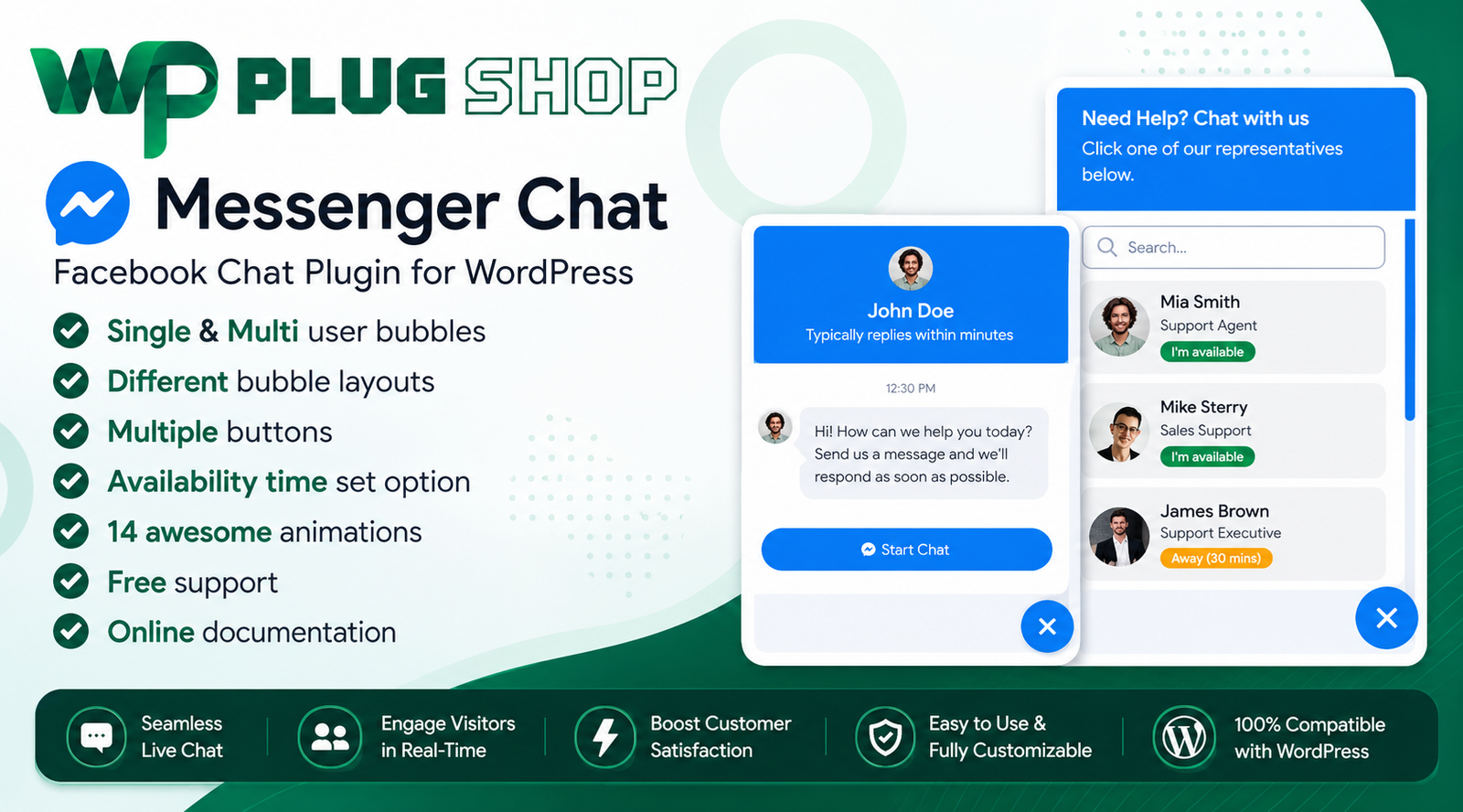
Preview Messenger Chat Support – Facebook Messenger WordPress Plugin
View the product artwork, switch gallery images, and open a larger preview before checkout.
Get secure digital access for real WordPress projects
This section summarizes the buying experience and what customers can expect after checkout.
Product overview, benefits, and digital access details
Review the key product details, practical use cases, and digital access information before checkout.
Frequently Asked Questions About Messenger Chat Support
What is Messenger Chat Support for WordPress?
Messenger Chat Support is a WordPress plugin that lets website visitors start conversations with a connected Facebook Page through a customizable Messenger chat interface. It can help businesses provide a familiar communication channel directly from their website.
How do I add Facebook Messenger chat to WordPress?
You can use Messenger Chat Support to integrate Facebook Messenger communication into a WordPress website. The plugin provides configurable chat elements that can be displayed on your website and connected with a Facebook Page.
Can visitors message my Facebook Page from my website?
Yes. Messenger Chat Support is designed to let website visitors communicate with a connected Facebook Page through the Messenger interface, making it easier for visitors to contact a business without leaving the website experience.
Can I display a floating Messenger chat button?
Yes. The plugin supports floating Messenger bubble-style displays, allowing businesses to place a recognizable chat entry point on their WordPress website.
Can Messenger Chat Support display CTA buttons?
Yes. Messenger Chat Support includes configurable call-to-action options that can encourage website visitors to start a Messenger conversation or interact with the available support interface.
Can I customize when Messenger chat is available?
Yes. The plugin provides availability and scheduling controls that can be used to configure when the Messenger support interface should appear as available to website visitors.
Does Messenger Chat Support support offline status?
Yes. Offline availability can be configured so visitors can receive an appropriate indication when Messenger support is not currently available.
Can I configure the timezone for Messenger availability?
Yes. Messenger Chat Support includes timezone-related settings for scheduling availability, which can be useful for businesses operating according to specific working hours.
Can I control where the Messenger chat widget appears?
Yes. The plugin provides display controls that can be used to configure the Messenger chat interface according to the website layout and visitor experience.
Does Messenger Chat Support work on mobile devices?
Yes. The plugin includes device-specific display options, allowing website administrators to configure the Messenger chat experience for different device types such as desktop and mobile visitors.
Does Messenger Chat Support work with Elementor?
Yes. The plugin is designed to work with Elementor, making it suitable for WordPress websites built with the Elementor page builder and Elementor Pro.
Can Messenger Chat Support be used for customer support?
Yes. The plugin can provide a direct communication channel between website visitors and a connected Facebook Page, making it useful for customer inquiries, pre-sales questions, support requests, and general business communication.
Can I use Messenger Chat Support on a WooCommerce store?
Yes. Because it works at the WordPress website level, Messenger Chat Support can be useful on WooCommerce stores that want to give shoppers a direct way to ask questions through Facebook Messenger.
Can Messenger Chat Support help increase customer engagement?
A visible Messenger chat option can make it easier for visitors to start a conversation with a business. This can support customer engagement by providing a familiar communication channel directly on relevant website pages.
Can I use Messenger Chat Support for multiple Facebook Pages?
The product listing supports Facebook Page-based Messenger configurations and provides options for managing Messenger chat functionality. The exact number of supported pages and configuration options should be verified against the version available with your purchase.
Who should use Messenger Chat Support?
The plugin can be useful for businesses, agencies, freelancers, WooCommerce store owners, service providers, bloggers, publishers, and other WordPress website owners who want to connect website visitors with Facebook Messenger.
Is Messenger Chat Support a replacement for every live chat platform?
Not necessarily. Messenger Chat Support is focused on integrating Facebook Messenger communication into WordPress. Businesses that require an independent live-chat platform, ticketing system, CRM, or omnichannel support solution may need additional tools.
Can I customize Messenger chat animations?
Yes. The plugin includes floating bubble animation options that can help make the Messenger chat entry point more noticeable while maintaining a configurable website experience.
Why add Facebook Messenger support to a WordPress website?
Adding Messenger support can provide visitors with a familiar communication method for asking questions, requesting information, or contacting a business. It can be especially useful for websites that already use Facebook Pages as part of their customer communication strategy.
Is Messenger Chat Support suitable for business websites?
Yes. Business websites can use the plugin to provide a direct Messenger contact option, configure availability schedules, display support status, and give visitors an easy way to begin a conversation.
Frequently Asked Questions About Messenger Chat Support
What is Messenger Chat Support for WordPress?
Messenger Chat Support is a WordPress plugin that adds Facebook Messenger communication to your website, allowing visitors to contact a connected Facebook Page through a customizable chat interface.
How do I add Facebook Messenger chat to WordPress?
Messenger Chat Support provides tools for integrating Facebook Messenger into a WordPress website. You can configure the available Messenger interface and connect it with the appropriate Facebook Page.
Can website visitors message my Facebook Page?
Yes. The plugin is designed to provide a direct Messenger communication channel between your website visitors and a connected Facebook Page.
Can I add a floating Messenger chat button to WordPress?
Yes. Messenger Chat Support includes floating Messenger bubble options that can provide visitors with a persistent and recognizable way to start a conversation.
Can I customize Messenger chat availability?
Yes. Availability scheduling and timezone controls allow administrators to configure when Messenger support should be presented as available to website visitors.
Can the Messenger widget show an offline status?
Yes. The plugin provides an offline status option that can indicate when Messenger support is not currently available.
Does Messenger Chat Support work with Elementor?
Yes. Messenger Chat Support supports Elementor-based WordPress websites, including Elementor Pro, making it suitable for websites created with the Elementor page builder.
Can I use Messenger Chat Support with WooCommerce?
Yes. The plugin can be used on WooCommerce websites where store owners want to give customers a direct Facebook Messenger contact option for product questions, pre-sales inquiries, or general support.
Can Messenger Chat Support be used for customer support?
Yes. It can provide a direct communication channel for customer questions, service inquiries, pre-sales conversations, and other business-related communication through Facebook Messenger.
Does Messenger Chat Support work on mobile devices?
Yes. The plugin includes device-specific display controls, allowing administrators to configure how the Messenger chat interface appears across supported device types.
Can I customize the Messenger chat bubble?
Yes. Messenger Chat Support provides customization and display options for its Messenger bubble interface, including animation-related settings that can make the chat entry point more noticeable.
Can I use Messenger Chat Support for business websites?
Yes. Businesses can use the plugin to place a direct Messenger contact option on their WordPress website and provide visitors with a familiar way to start conversations.
Who should use Messenger Chat Support?
The plugin can be useful for businesses, agencies, freelancers, service providers, bloggers, publishers, WooCommerce store owners, and WordPress website administrators who use Facebook Messenger for customer communication.
Can Messenger Chat Support improve website engagement?
A visible Messenger contact option can reduce friction for visitors who want to ask questions or contact a business. Its effectiveness depends on factors such as website placement, audience, response time, and the overall customer-support process.
Can I schedule Messenger support according to business hours?
Yes. Availability scheduling and timezone settings can be used to configure Messenger support around specific operating hours.
Is Messenger Chat Support a complete live chat platform?
Messenger Chat Support is primarily designed to connect WordPress websites with Facebook Messenger. Businesses requiring features such as an independent live-chat system, ticket management, CRM integration, or omnichannel support may need additional solutions.
Can I use Messenger Chat Support for pre-sales questions?
Yes. WooCommerce stores and business websites can use Messenger as a direct communication channel for product questions, service inquiries, pricing discussions, and other pre-sales conversations.
Why add Facebook Messenger support to a WordPress website?
Adding Facebook Messenger gives visitors a familiar communication method directly from the website. This can be useful for businesses that already use Facebook Pages as part of their customer engagement and support workflow.
Can Messenger Chat Support display different chat behavior by device?
Yes. The plugin provides device-specific display controls that can help administrators configure the Messenger experience for different visitor devices.
Is Messenger Chat Support suitable for WooCommerce customer communication?
Yes. WooCommerce stores can use Messenger Chat Support to provide customers with a direct communication option for product questions, shopping assistance, pre-sales inquiries, and general store communication.
Frequently Asked Questions About Messenger Chat Support
What is Messenger Chat Support for WordPress?
Messenger Chat Support is a WordPress plugin that integrates Facebook Messenger communication into a website, giving visitors a convenient way to contact a connected Facebook Page directly from the site.
How can I add Facebook Messenger chat to WordPress?
Install Messenger Chat Support on your WordPress website and configure the available Messenger settings and connected Facebook Page. The plugin provides a customizable chat interface that can be displayed to website visitors.
Can visitors contact my Facebook Page from WordPress?
Yes. Messenger Chat Support is designed to connect website visitors with a configured Facebook Page through Facebook Messenger, providing a direct communication channel from your WordPress website.
Can I add a floating Facebook Messenger button?
Yes. The plugin provides floating Messenger bubble functionality that can give visitors a persistent and recognizable way to start a Messenger conversation from your website.
Can I customize the Messenger chat display?
Yes. Messenger Chat Support provides configuration options for the chat interface, including display behavior, floating bubble settings, animations, buttons, availability, and device-specific visibility.
Can I set Messenger support hours?
Yes. Availability scheduling allows website administrators to configure when Messenger support should be presented as available. Timezone settings can also be used when support hours need to follow a particular location.
Can the plugin display an offline status?
Yes. Messenger Chat Support provides an offline status option that can help communicate when Messenger-based customer support is not currently available.
Does Messenger Chat Support work with Elementor?
Yes. Messenger Chat Support is compatible with Elementor-based WordPress websites, making it suitable for businesses and agencies building pages with Elementor or Elementor Pro.
Can I use Messenger Chat Support with WooCommerce?
Yes. WooCommerce store owners can use the plugin to provide customers with a direct Messenger contact option for product questions, pre-sales inquiries, shopping assistance, and general customer communication.
Can Messenger Chat Support be used for customer service?
Yes. The plugin can provide a direct Facebook Messenger communication channel for customer questions, service inquiries, product discussions, pre-sales conversations, and general business support.
Does the Messenger chat widget work on mobile devices?
Yes. The plugin includes device-specific display controls, allowing administrators to configure how the Messenger interface is presented to visitors using different devices.
Can I use Messenger Chat Support for multiple Facebook Pages?
The plugin includes Facebook Page and Messenger configuration options designed for business communication scenarios. The exact number of supported pages and available configuration options should be verified against the specific product version being used.
Can I add Messenger chat to a business website?
Yes. Business websites can use Messenger Chat Support to provide a visible Facebook Messenger contact option and make it easier for potential customers to begin a conversation.
Can Messenger Chat Support help with pre-sales communication?
Yes. Businesses and WooCommerce stores can use Messenger as a communication channel for product questions, service inquiries, pricing discussions, purchasing guidance, and other pre-sales conversations.
Can Messenger Chat Support improve customer engagement?
A clearly visible Messenger contact option can reduce friction for visitors who want to ask questions or contact a business. Actual engagement results depend on factors such as placement, audience, response time, and customer-support quality.
Can I control Messenger chat visibility by device?
Yes. Device-specific display settings allow administrators to configure the Messenger chat experience for different visitor devices and website layouts.
Is Messenger Chat Support a standalone live chat platform?
No. Messenger Chat Support is primarily designed to integrate Facebook Messenger with WordPress. Businesses that require a separate ticketing system, CRM, omnichannel inbox, or independent live-chat platform may need additional software.
Who should use Messenger Chat Support?
The plugin is suitable for businesses, agencies, freelancers, service providers, bloggers, publishers, WooCommerce store owners, and WordPress administrators who want to connect website visitors with Facebook Messenger.
Why add Facebook Messenger to a WordPress website?
Adding Facebook Messenger can give visitors a familiar way to contact a business without requiring a separate contact workflow. It is particularly useful for businesses that already use Facebook Pages for customer communication and engagement.
Is Messenger Chat Support useful for WooCommerce customer support?
Yes. WooCommerce stores can use the Messenger chat widget to provide shoppers with a direct communication option for product information, pre-sales questions, order-related inquiries, and general store assistance, subject to the store's support workflow.
Quick product answers for buyers and AI search
Clear product answers help buyers, search engines, and AI answer engines understand this product faster.
Best ways to use this WordPress digital product
These use cases help buyers quickly decide if this product fits their workflow.
How digital access works
No physical shipping is required. This is a digital product access purchase designed for account-based downloads.
Secure payment options for digital checkout
WPPlugShop supports trusted checkout options so buyers can complete digital purchases with more confidence.
Frequently asked questions
Buyer-focused answers about digital access, secure payments, downloads, support, and product usage.
Related WordPress tools you may also like
Explore related WordPress tools that may support the same workflow, website type, or project goal.




Choose the right WordPress tool with confidence
Request a product, explore membership access, or contact support if you want help choosing the right WordPress digital product before checkout.