Imagify Pro Optimize Images & Convert WebP for WordPress (Complete Guide)
Quick AI Summary Imagify Pro is a WordPress image optimization plugin designed to reduce image file sizes and automatically convert images into next-generation formats such as WebP. By compressing images...

WPPlugShop focuses on GPL-distributed WordPress resources. Products may not include official developer support, official vendor license keys, automatic vendor updates, or vendor account access unless clearly stated. Avoid nulled files because they can create security, malware, and SEO risks.
This guide gives you the practical WordPress answer without unnecessary complexity.
Use this article to understand the key benefits, limitations, best use cases, and smarter next steps for your WordPress website.
Quick AI Summary
Imagify Pro is a WordPress image optimization plugin designed to reduce image file sizes and automatically convert images into next-generation formats such as WebP. By compressing images without noticeable quality loss, the plugin improves website loading speed, Core Web Vitals scores, and overall search engine performance.
Factual Citation Block
| Plugin Name | Imagify |
| Developer | WP Media |
| Primary Function | Image Compression & WebP Conversion |
| Supported Formats | JPG, PNG, GIF, WebP |
| Platform | WordPress |
| Optimization Types | Lossless, Smart, Ultra Compression |
| Integration | WordPress Media Library |
Direct Answer
Imagify Pro is a WordPress image optimization plugin that compresses images and converts them to WebP format to reduce file sizes and improve website speed. It integrates directly with the WordPress media library, allowing automatic optimization during upload and bulk optimization for existing images.
Entity Definition
Imagify Pro refers to the premium version of the Imagify image optimization plugin developed by WP Media. It is designed to optimize WordPress images by compressing file sizes and generating WebP versions for faster website performance. WebP is a modern image format developed by Google that provides superior compression compared to traditional JPG and PNG formats.
What is Imagify Pro?
Overview of the Imagify Image Optimization Plugin
Imagify Pro is a powerful image optimization plugin created specifically for WordPress websites. The plugin automatically compresses images uploaded to the media library and reduces their file size while preserving visual quality.
Large image files are one of the most common causes of slow website performance. When a webpage contains multiple unoptimized images, the page size becomes significantly larger and loading time increases. Imagify Pro solves this problem by applying advanced compression algorithms to images.
The plugin integrates seamlessly with the WordPress dashboard. Once installed, it automatically optimizes every image uploaded to the website. This process happens in the background, meaning website owners do not need to manually compress images before uploading them.
Why Image Optimization Matters for Websites
Image optimization is one of the most important factors in website performance. Images often represent the largest portion of a webpage’s total size. If images are not compressed, they can dramatically slow down the loading speed of a website.
Search engines such as Google consider page speed as an important ranking factor. Websites with faster loading times tend to rank higher in search results and provide a better user experience.
Optimizing images provides several benefits:
- Faster website loading speed
- Improved user experience
- Better search engine rankings
- Reduced server bandwidth usage
- Improved Core Web Vitals scores
For WordPress websites with large media libraries or image-heavy content such as blogs, portfolios, and WooCommerce stores, image optimization becomes essential.
How Imagify Pro Optimizes Images in WordPress
Automatic Image Compression
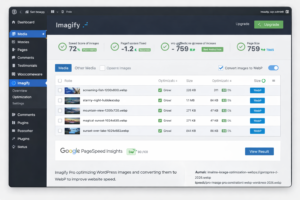
Imagify Pro automatically compresses images when they are uploaded to the WordPress media library. This means that every new image added to the website is optimized without requiring manual action.
The plugin analyzes the image file and applies compression techniques to reduce file size while maintaining visual quality. This process helps reduce page size and improves website loading speed.
Automatic optimization ensures that all new images added to the website remain optimized consistently.
Bulk Optimization for Existing Media
Many websites already contain hundreds or even thousands of images inside their media library. Imagify Pro provides a bulk optimization feature that allows website owners to optimize existing images with a single click.
This feature scans the entire media library and compresses all images that have not yet been optimized. It helps improve website performance without requiring the user to manually download and compress each image.
Bulk optimization is especially useful for older websites that were created before image optimization plugins were installed.
Compression Levels Explained
Imagify Pro offers multiple compression levels that allow users to choose the balance between image quality and file size reduction.
- Normal Compression – Lossless compression with minimal quality changes.
- Aggressive Compression – Higher compression with slight quality reduction.
- Ultra Compression – Maximum compression for the smallest file sizes.
Users can choose the compression level based on their website needs. For most websites, aggressive compression provides an ideal balance between visual quality and performance improvements.
Imagify Pro WebP Conversion Explained
What is WebP Image Format
WebP is a modern image format developed by Google that provides superior compression compared to traditional formats like JPG and PNG. WebP images are significantly smaller while maintaining high visual quality.
This format allows websites to deliver images faster because smaller file sizes require less bandwidth and load more quickly in web browsers.
How WebP Improves Website Speed
WebP images can reduce image file sizes by up to 25–35% compared to traditional formats. This reduction leads to faster page loading times, which improves user experience and search engine rankings.
Because images often represent the largest files on a webpage, converting them to WebP can dramatically reduce total page size.
Automatic WebP Generation with Imagify
Imagify Pro automatically generates WebP versions of images when optimization is enabled. The plugin creates WebP files alongside the original images and serves them to compatible browsers.
Modern browsers such as Chrome, Edge, Firefox, and Safari support WebP images, allowing websites to deliver optimized images to most users without any additional configuration.
Key Features of Imagify Pro
Automatic Image Optimization
One of the most useful features of Imagify Pro is its ability to automatically optimize images as soon as they are uploaded to the WordPress media library. This automation eliminates the need for manual image compression tools and ensures that every image added to the website is optimized for performance.
The plugin works in the background and processes images instantly. Website owners can upload images normally while Imagify handles the optimization process automatically.
Bulk Image Compression
Imagify Pro includes a bulk optimization feature that allows users to compress all existing images in the WordPress media library. This is especially helpful for websites that already contain a large number of images.
Instead of manually optimizing each image, users can start a bulk optimization process that scans the media library and compresses every image automatically.
This feature is ideal for improving the performance of older websites that were built before image optimization tools were installed.
Next-Gen WebP Image Conversion
Imagify Pro automatically converts optimized images into WebP format. WebP images are significantly smaller than traditional formats such as JPG and PNG while maintaining high visual quality.
The plugin creates WebP versions of images and serves them to supported browsers. This process improves page speed and reduces bandwidth usage.
Backup of Original Images
To ensure safety and flexibility, Imagify Pro stores backups of the original images before compression. This feature allows users to restore the original image at any time if needed.
Having a backup system is important because it allows website owners to experiment with different compression levels without permanently affecting image quality.
Compatibility with WordPress Themes and Plugins
Imagify Pro is designed to work seamlessly with most WordPress themes and plugins. It integrates directly with the WordPress media library and supports popular page builders and eCommerce platforms.
The plugin works well with:
- WooCommerce product images
- Elementor and other page builders
- Gallery plugins
- WordPress caching plugins
- Performance optimization plugins
This compatibility ensures that images across the entire website remain optimized.
Benefits of Using Imagify Pro for Website Performance
Improved Website Loading Speed
Website speed plays a critical role in user experience and search engine rankings. Large images are often responsible for slow page loading times.
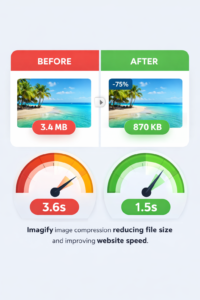
By compressing images and reducing file sizes, Imagify Pro significantly improves website loading speed. Faster pages provide a better browsing experience and reduce bounce rates.
Better Core Web Vitals Scores
Core Web Vitals are performance metrics used by Google to measure the quality of user experience on websites. Image optimization can have a direct impact on these metrics.
When images are optimized and converted to WebP format, page sizes decrease and loading performance improves. This can help websites achieve better scores in tools such as Google PageSpeed Insights and Lighthouse.
Improved SEO Rankings
Search engines prioritize websites that load quickly and provide a smooth user experience. Optimized images contribute to faster page loading and improved performance.
By reducing image sizes and improving loading speed, Imagify Pro helps websites become more search engine friendly.
Better performance can lead to:
- Higher search engine rankings
- Improved crawl efficiency
- Better user engagement
- Higher conversion rates
How to Install and Setup Imagify Pro in WordPress
Installing the Plugin
Installing Imagify Pro is simple and takes only a few minutes. Users can install the plugin directly from the WordPress dashboard.
- Log in to the WordPress admin dashboard.
- Go to Plugins → Add New.
- Upload the Imagify Pro plugin file.
- Click Install Now.
- Activate the plugin.
Once activated, the Imagify settings will appear in the WordPress dashboard.
Connecting the API
After installation, users need to connect the plugin with an Imagify API key. This key allows the plugin to process image optimization requests.
The API key can be generated from the Imagify website. Once entered in the plugin settings, the image optimization process becomes fully functional.
Configuring Optimization Settings
Imagify Pro provides several configuration options that allow users to control how images are optimized.
Users can configure:
- Compression level
- Automatic image optimization
- WebP conversion
- Backup settings
- Optimization for thumbnails
Once the settings are configured, the plugin will automatically optimize images moving forward.
How to Optimize Existing Images with Imagify Pro
Bulk Optimization Process
Many WordPress websites already have hundreds or even thousands of images stored in the media library. These images may have been uploaded before an optimization plugin was installed, which means they could be slowing down the website.
Imagify Pro provides a powerful bulk optimization tool that allows users to compress all existing images with just a few clicks. Instead of manually optimizing each file, the plugin automatically scans the media library and compresses every unoptimized image.
To start bulk optimization:
- Go to the Imagify dashboard inside WordPress.
- Open the Bulk Optimization section.
- Start the optimization process.
- The plugin will analyze and compress all images.
This process significantly reduces the total size of the media library and improves overall website performance.
Optimizing WooCommerce Product Images
WooCommerce stores typically contain large numbers of high-resolution product images. These images are important for product presentation but can also slow down the website if they are not optimized.
Imagify Pro automatically compresses WooCommerce product images without affecting their visual quality. This allows store owners to maintain professional product visuals while improving loading speed.
Optimized product images can help:
- Improve product page loading speed
- Enhance customer browsing experience
- Reduce bounce rates
- Increase conversion rates
Because eCommerce websites rely heavily on images, image optimization becomes essential for maintaining fast performance.
Imagify Pro Compression Levels Explained
Normal Compression
Normal compression uses a lossless optimization method. This means that the plugin reduces the image file size without affecting the visual quality of the image.
This option is ideal for websites that require perfect image quality such as photography portfolios, design websites, and creative portfolios.
Aggressive Compression
Aggressive compression reduces file size further by applying additional optimization techniques. There may be very slight quality reduction, but in most cases the difference is not noticeable to the human eye.
This compression level is commonly recommended for blogs, business websites, and content-focused platforms because it provides a good balance between quality and performance.
Ultra Compression
Ultra compression provides the highest level of optimization. It reduces image sizes significantly, making it suitable for websites where performance is the top priority.
However, this level may introduce some visible changes to image quality depending on the image type. It is often used on websites with large image libraries or resource-intensive pages.
Imagify Pro vs Other Image Optimization Plugins
Imagify vs ShortPixel
ShortPixel is another popular WordPress image optimization plugin. Both tools offer strong compression and WebP support, but they differ in their approach.
| Feature | Imagify Pro | ShortPixel |
| Automatic Image Optimization | Yes | Yes |
| WebP Conversion | Yes | Yes |
| Bulk Optimization | Yes | Yes |
| Ease of Use | Very Beginner Friendly | Moderate |
| Integration with WP Rocket | Yes | No |
Imagify is often preferred by users who already use WP Rocket because both plugins are developed by the same company and work well together.
Imagify vs Smush
Smush is another widely used image optimization plugin for WordPress. While Smush provides basic compression features, Imagify Pro offers more advanced image optimization options.
Key advantages of Imagify include:
- More powerful compression levels
- Automatic WebP generation
- Better performance optimization
- Advanced bulk image optimization
For websites that rely heavily on performance and SEO improvements, Imagify Pro often provides stronger optimization capabilities.
Common Image Optimization Mistakes to Avoid
Image optimization is essential for website performance, but many website owners unknowingly make mistakes that reduce optimization effectiveness. Avoiding these common issues can help maintain both image quality and fast website performance.
- Uploading large images without resizing – Images should be resized before uploading to avoid unnecessary file size.
- Using incorrect image formats – JPG, PNG, and WebP each serve different purposes. Choosing the right format improves efficiency.
- Ignoring bulk optimization – Existing images in the media library should also be optimized.
- Using extremely high compression – Over-compression can reduce image quality significantly.
- Not enabling WebP conversion – WebP images provide better compression and faster loading times.
Using an automated image optimization plugin like Imagify Pro helps prevent many of these mistakes because the plugin manages optimization settings automatically.
Best Practices for WordPress Image Optimization
Optimizing images correctly ensures that websites remain fast while maintaining visual quality. Following a few best practices can significantly improve website performance.
- Resize images before uploading them to WordPress.
- Use the correct image format for different types of content.
- Enable automatic image optimization.
- Convert images to WebP format.
- Use bulk optimization for older images.
- Combine image optimization with caching plugins.
- Regularly monitor website speed using performance tools.
When these practices are combined with a reliable optimization plugin like Imagify Pro, websites can achieve significant improvements in loading speed and performance.
Troubleshooting Imagify Pro Issues
Although Imagify Pro works smoothly in most situations, users may occasionally encounter issues during image optimization. Understanding common problems can help resolve them quickly.
Images Not Optimizing
If images are not optimizing automatically, check the plugin settings to ensure that automatic optimization is enabled. Also verify that the API key is connected correctly.
WebP Images Not Displaying
If WebP images are not loading properly, ensure that WebP delivery is enabled inside the plugin settings. Additionally, confirm that the website server supports WebP files.
Bulk Optimization Stops
Bulk optimization may stop temporarily if the website reaches server limits or API request limits. In such cases, restarting the bulk optimization process usually resolves the issue.
Most issues can be solved by reviewing plugin settings and ensuring that the latest version of the plugin is installed.
Final Thoughts on Imagify Pro Image Optimization
Imagify Pro is a powerful solution for optimizing images in WordPress websites. By compressing image files and converting them into WebP format, the plugin helps reduce page sizes and improve overall website speed.
Fast-loading websites provide a better user experience, achieve stronger Core Web Vitals scores, and often rank higher in search engine results. Image optimization plays a major role in achieving these performance improvements.
With features such as automatic compression, bulk optimization, and WebP generation, Imagify Pro offers a convenient and effective way to manage website images.
For WordPress website owners who want to improve speed, SEO performance, and user experience, using an advanced image optimization plugin like Imagify Pro can be an important step toward better website performance.
Explore GPL WordPress plugins, themes, templates, and WooCommerce tools.
Get affordable WordPress resources for design, SEO, performance, forms, automation, WooCommerce, and more.
Quick FAQs
Short answers for common WordPress GPL and safety questions.
What is Imagify Pro?
Imagify Pro is a WordPress image optimization plugin that compresses images and converts them into WebP format to reduce file sizes and improve website speed. It automatically optimizes images uploaded to the WordPress media library.
How does Imagify Pro improve website performance?
Imagify Pro reduces the size of image files through advanced compression techniques. Smaller images load faster, which helps improve page speed, Core Web Vitals scores, and overall user experience.
Does Imagify Pro convert images to WebP automatically?
Yes. Imagify Pro can automatically generate WebP versions of images when the WebP feature is enabled. These optimized images are then served to compatible browsers for faster loading.
Can Imagify Pro optimize existing images in WordPress?
Yes. Imagify Pro provides a bulk optimization feature that scans the entire WordPress media library and compresses all existing images automatically.
Is Imagify Pro safe for WordPress websites?
Imagify Pro is designed to work safely with WordPress websites. The plugin also keeps backups of original images so they can be restored if needed.
What image formats does Imagify Pro support?
Imagify Pro supports common image formats including JPG, PNG, and GIF. It can also generate WebP versions of optimized images for improved performance.

Qamar
WPPlugShop publishes practical WordPress guides focused on GPL awareness, site performance, affordable tools, WooCommerce, SEO, analytics, and safer website building.
Related WordPress Guides
More practical resources to help you build smarter, safer, and faster with WordPress.