
Final User – WordPress Front-End User Profiles & User Management
Verified from VirusTotal 100% Original Product and Virus Free. Free New Version Lifetime On Single Purchase. Unlimited Website Usage Price is in US dollars and included tax
Buy confidently with secure digital checkout, account-based downloads, and a cleaner WPPlugShop product experience.
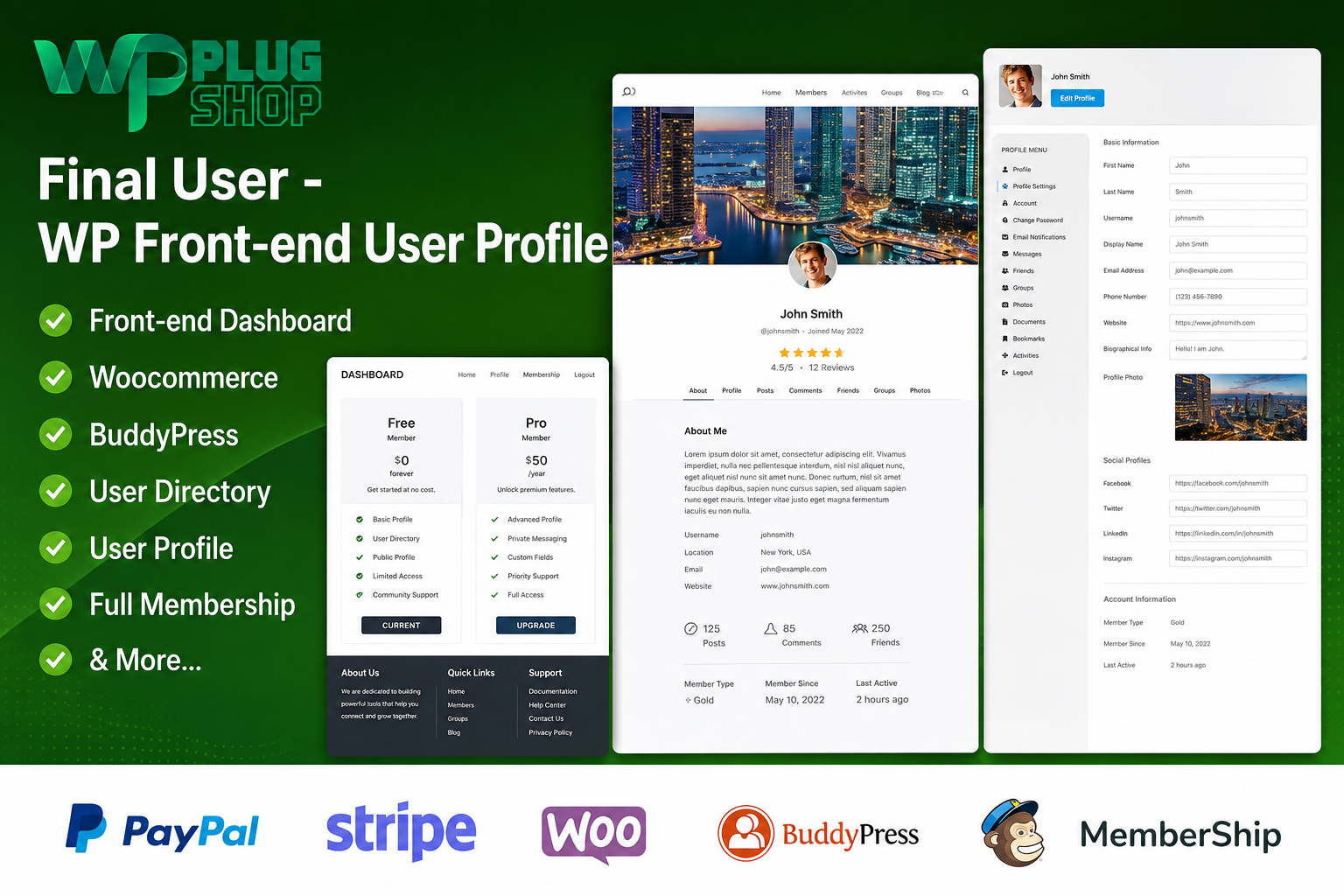
Preview Final User – WordPress Front-End User Profiles & User Management
View the product artwork, switch gallery images, and open a larger preview before checkout.
Get secure digital access for real WordPress projects
This section summarizes the buying experience and what customers can expect after checkout.
Product overview, benefits, and digital access details
Review the key product details, practical use cases, and digital access information before checkout.
Final User – WordPress Front-End User Profiles & User Management
Create a more user-friendly WordPress experience with front-end profiles, registration, login, dashboards, custom fields, and member-directory functionality. Final User – WP Front-end User Profiles is designed for WordPress websites that want users to manage profile information from the front end instead of relying on the WordPress administration area.
It is well suited to membership websites, online communities, user directories, professional networks, and other WordPress projects where front-end user profile management is an important part of the website experience.
What Is a WordPress Front-End User Profile Plugin?
A WordPress front-end user profile plugin allows registered users to interact with their account and profile information directly from website pages. Instead of sending users to wp-admin for everyday profile tasks, a front-end profile system can provide dedicated pages for registration, login, profile editing, and account management.
Final User focuses on creating this type of front-end user experience, with features for editable profiles, user dashboards, custom fields, profile images, member directories, and role-based user management.
Build Front-End User Profiles in WordPress
Give registered users a dedicated profile experience that can be integrated into the front end of your WordPress website. Users can manage supported profile information while administrators can structure the available fields and profile experience according to the website's requirements.
Front-End Profile Creation and Editing
Allow users to create and edit their profile information through front-end pages rather than requiring regular members to work inside the WordPress dashboard.
Custom Registration and Login
Create front-end registration and login flows that fit naturally into a member-focused WordPress website.
User Dashboards
Provide users with a centralized front-end area for managing supported account and profile information.
Profile Images and Cover Images
Support richer user profiles with profile photos and cover-image areas where enabled by the product configuration.
Member Directory
Create a searchable and filterable member-directory experience for websites that need to display registered users or community members.
Custom Profile Fields
Collect additional information through supported custom fields such as text, select, and file-upload fields.
Key Features
- Front-End User Profiles: Create editable user profiles directly on the front end of a WordPress website.
- Front-End Registration: Provide custom registration forms for new users.
- Front-End Login: Create user login experiences on website pages.
- User Dashboards: Give users a dedicated area for supported profile and account management.
- Custom Profile Fields: Collect additional user information through configurable fields.
- Profile Photos: Allow profile images to be used as part of the user profile experience.
- Cover Images: Create more visually complete profile layouts with cover-image support.
- Member Directory: Display users through a searchable and filterable directory.
- User Roles: Support role-based user management and permissions where configured.
- Email Verification: Support email verification workflows for user accounts.
- Password Reset: Provide a front-end-oriented password recovery experience.
- Shortcode Support: Place supported user-profile functionality on WordPress pages and posts.
Product Details
| Detail | Information |
|---|---|
| Product Name | Final User – WP Front-end User Profiles |
| Product Type | WordPress Front-End User Profile & Management Plugin |
| Platform | WordPress |
| Primary Function | Front-end user profiles, registration, login, dashboards, and member directories |
| Profile Features | Editable fields, profile images, cover images, and user information |
| Directory Features | User search and filtering |
| Custom Fields | Supported field types include text, select, and file uploads |
| Best For | Membership sites, communities, directories, and user-focused WordPress websites |
Why Use Front-End User Profiles in WordPress?
WordPress provides powerful administrative user management, but many public-facing websites need a more convenient experience for regular users. Members may need to register, log in, update their profile, upload an image, or manage account information without interacting with the WordPress administration interface.
A front-end user profile system helps move these interactions into the website itself. This can make the member experience more consistent with the design and navigation of the rest of the website.
WordPress Front-End User Registration
Front-end registration is useful when a website needs visitors to become registered members through a dedicated website page. Instead of directing users toward the standard WordPress registration experience, site owners can create a registration workflow that is integrated into the site's front-end interface.
This is particularly useful for membership websites, communities, directories, and other projects where user registration is a central part of the website.
WordPress Front-End Login
A front-end login page can provide users with a familiar website-based entry point to their accounts. Combined with a front-end profile and dashboard, it creates a more cohesive account experience.
The exact login and authentication workflow depends on the WordPress configuration and the settings enabled for the plugin.
Custom WordPress User Profile Fields
Different websites require different types of member information. A professional directory may need a job title and company, while a community website may require interests, biography information, or other profile details.
Final User supports custom profile fields, including text, select, and file-upload field types according to the documented product feature set.
Custom fields can help transform a basic WordPress user profile into a more useful member profile tailored to the website's purpose.
WordPress Member Directory
A member directory can make registered users discoverable through a dedicated front-end listing. Final User includes directory functionality with search and filtering capabilities, making it suitable for websites that need a searchable collection of member profiles.
This can be useful for professional communities, membership organizations, online communities, user directories, and other websites where members need to find or browse other registered users.
Profile Photos and Cover Images
Visual profile elements can make member directories and user profiles easier to recognize. Final User supports profile photos and cover-image areas as part of its front-end profile functionality.
These features can be useful for community websites and professional member directories where a more visual profile presentation is desirable.
User Dashboards and Account Management
A front-end user dashboard provides a central location where users can manage supported profile information. This helps keep common account tasks within the website's public-facing interface.
For member-focused websites, a dedicated dashboard can provide a more natural experience than asking regular users to navigate through WordPress administration screens.
WordPress User Roles and Permissions
User roles are an important part of WordPress account management. Final User includes role-based access and permissions within its documented feature set.
When configuring roles, administrators should carefully review which capabilities each role should have and test the resulting user experience before deploying the configuration on a live website.
Email Verification and Password Reset
User account workflows often require account verification and password recovery. Final User includes email verification and password-reset functionality to support common account-management scenarios.
Actual email delivery depends on the WordPress website's mail configuration and hosting environment.
Shortcode-Based WordPress User Profiles
Shortcodes can make it easier to place supported profile functionality on selected WordPress pages or posts. This provides flexibility when creating dedicated registration, login, profile, or member-area pages.
The exact shortcode structure and available options should be reviewed against the installed product version before implementation.
Use Cases
| Use Case | How Front-End Profiles Can Help |
|---|---|
| Membership Website | Provide members with front-end profiles and account-management pages. |
| Online Community | Let registered users maintain profiles and discover other members. |
| Professional Directory | Create searchable member profiles containing relevant information. |
| Organization Website | Present members or staff through structured user profiles. |
| User-Based Website | Move common profile and account interactions to the website front end. |
Feature Comparison
| Capability | Final User | Potential Use |
|---|---|---|
| Front-End Profiles | Yes | User profile management |
| Front-End Registration | Yes | Member onboarding |
| Front-End Login | Yes | Website-based account access |
| User Dashboard | Yes | Centralized account experience |
| Custom Fields | Yes | Collect additional profile information |
| Profile Photo | Yes | Visual user identification |
| Cover Image | Yes | Enhanced profile presentation |
| Member Directory | Yes | Searchable user listings |
| Email Verification | Yes | Account verification workflows |
| Password Reset | Yes | Account recovery |
| Shortcodes | Yes | Place supported features on WordPress pages |
Front-End Profiles vs Standard WordPress User Management
| Approach | User Experience | Best Suited For |
|---|---|---|
| Standard WordPress User Management | Users may rely more heavily on administration-area interfaces. | Traditional websites with limited public user interaction |
| Front-End User Profiles | Users can manage supported profile functions through website pages. | Membership sites, communities, directories, and user-focused websites |
Benefits for WordPress Website Owners
- Create a more user-friendly front-end account experience.
- Allow users to edit supported profile information from website pages.
- Create dedicated registration and login workflows.
- Collect additional information through custom profile fields.
- Build searchable and filterable member directories.
- Use profile images and cover images for richer member profiles.
- Keep common user interactions closer to the website's front-end design.
- Support membership, community, directory, and user-focused website projects.
Pros and Considerations
| Pros | Considerations |
|---|---|
| Provides front-end user profile functionality | Exact behavior depends on the installed version and configuration |
| Includes registration and login workflows | User roles and permissions should be configured carefully |
| Supports custom profile fields | Profile fields should only collect information appropriate for the website |
| Includes member-directory functionality | Directory visibility should be reviewed for the privacy requirements of the website |
| Supports profile photos and cover images | Media uploads should be tested with the site's hosting and WordPress configuration |
| Shortcodes provide flexible page placement | Shortcode behavior should be checked against the current product documentation |
Who Should Use Final User?
Final User is particularly suitable for WordPress website owners who need front-end user profile management rather than relying exclusively on standard WordPress administration pages.
It can be useful for membership websites, online communities, professional directories, organizations, user-focused websites, and projects where registered users need editable profiles and dedicated account areas.
WordPress Profile Management for Membership Websites
Membership websites often depend on a smooth registration and account experience. Front-end profiles can give members a dedicated place to manage supported information while keeping the overall interaction within the site's front-end design.
For more complex membership requirements, the plugin should be evaluated alongside the site's existing membership, authentication, content-restriction, and payment systems.
WordPress User Directory for Communities
Communities can use searchable member directories to help users discover other registered members. Profile information can be organized through custom fields and presented through profile layouts appropriate for the website.
This makes the product relevant to community sites where user profiles and member discovery are important parts of the overall website experience.
WordPress Front-End Account Experience
A consistent front-end account experience can make a WordPress website feel more cohesive. Instead of sending members between public-facing pages and administration screens, supported profile and account functions can be presented through dedicated website pages.
Final User provides a framework for this type of front-end user management while giving administrators control over the profile fields and user functionality used by their website.
Important Configuration Considerations
Before deploying a front-end profile system, test registration, login, profile editing, custom fields, user roles, directory visibility, email verification, password recovery, and media uploads using appropriate test accounts.
If the website already uses membership, community, form, page-builder, authentication, or other user-management plugins, check compatibility and avoid duplicating overlapping functionality unnecessarily.
WP Plug Shop Digital Access
Get access to Final User – WP Front-end User Profiles through WP Plug Shop and add a practical front-end user-management resource to your WordPress toolkit.
This WordPress-ready resource is intended for projects that need front-end profiles, user registration, login, dashboards, custom profile fields, member directories, and related account-management functionality.
Before installation, review your WordPress environment, active plugins, theme, user roles, and required integrations to ensure the product matches your project requirements.
Key Takeaway
Final User – WordPress Front-End User Profiles & User Management provides a flexible foundation for creating user-focused WordPress websites. With front-end profiles, registration and login, dashboards, custom fields, profile images, member directories, email verification, password recovery, and shortcode-based placement, it can help transform standard WordPress user management into a more website-centered experience.
Frequently Asked Questions
What is a WordPress front-end user profile plugin?
A WordPress front-end user profile plugin allows registered users to manage supported profile and account information through website pages instead of relying entirely on the WordPress administration area.
Can users edit their WordPress profiles from the front end?
Yes. Final User is designed to provide front-end profile editing, allowing users to manage supported profile information through the website's front-end interface.
Can I create front-end user registration in WordPress?
Yes. Final User includes front-end registration functionality, making it possible to provide users with a website-based registration experience.
Can I create a front-end login page in WordPress?
Yes. The plugin includes front-end login functionality, allowing websites to provide a dedicated login experience outside the standard WordPress administration interface.
Does Final User provide a WordPress user dashboard?
Yes. Final User includes user-dashboard functionality that can provide registered users with a centralized area for supported profile and account-management activities.
Can I add custom fields to WordPress user profiles?
Yes. Final User supports custom profile fields, allowing website administrators to collect additional information from users through supported field types.
Can users upload profile pictures in WordPress?
Yes. The product supports profile-image functionality, allowing websites to create more visual user profiles. Media upload behavior should be tested with the website's WordPress and hosting configuration.
Can I create a WordPress member directory?
Yes. Final User includes member-directory functionality with search and filtering capabilities, making it suitable for communities, organizations, professional directories, and membership websites.
Is Final User suitable for membership websites?
Yes. Front-end profiles, registration, login, dashboards, custom fields, and member directories make the plugin suitable for many membership-oriented WordPress websites. More advanced membership requirements may require additional solutions.
Can I use Final User for a WordPress community website?
Yes. Community websites can use front-end profiles and member-directory features to help registered users maintain profiles and discover other members.
Does Final User support WordPress user roles?
Yes. User-role functionality is part of the product's documented feature set. Administrators should configure roles and permissions carefully according to the needs of their website.
Does Final User support email verification?
Yes. Email verification is included in the documented functionality. Successful email delivery also depends on the WordPress website's mail and hosting configuration.
Can users reset their WordPress passwords from the front end?
Final User includes password-reset functionality to support account recovery workflows. The exact experience depends on the plugin configuration and WordPress environment.
Can I place Final User features on WordPress pages?
Yes. The plugin supports shortcodes for placing supported user-profile functionality on WordPress pages and posts.
Who should use a WordPress front-end profile plugin?
It can be useful for membership sites, online communities, professional directories, organizations, user-focused websites, and any WordPress project where users need a more convenient front-end profile experience.
Should I test Final User before using it on a live WordPress website?
Yes. Test registration, login, profile editing, custom fields, user roles, directory visibility, email verification, password recovery, and media uploads before deploying the configuration on a live website.
Quick product answers for buyers and AI search
Clear product answers help buyers, search engines, and AI answer engines understand this product faster.
Best ways to use this WordPress digital product
These use cases help buyers quickly decide if this product fits their workflow.
How digital access works
No physical shipping is required. This is a digital product access purchase designed for account-based downloads.
Secure payment options for digital checkout
WPPlugShop supports trusted checkout options so buyers can complete digital purchases with more confidence.
Frequently asked questions
Buyer-focused answers about digital access, secure payments, downloads, support, and product usage.
Related WordPress tools you may also like
Explore related WordPress tools that may support the same workflow, website type, or project goal.




Choose the right WordPress tool with confidence
Request a product, explore membership access, or contact support if you want help choosing the right WordPress digital product before checkout.