
Gridbee Content Sharing WordPress Theme – User-Generated Content
Verified from VirusTotal 100% Original Product and Virus Free. Free New Version Lifetime On Single Purchase. Unlimited Website Usage Price is in US dollars and included tax
Buy confidently with secure digital checkout, account-based downloads, and a cleaner WPPlugShop product experience.
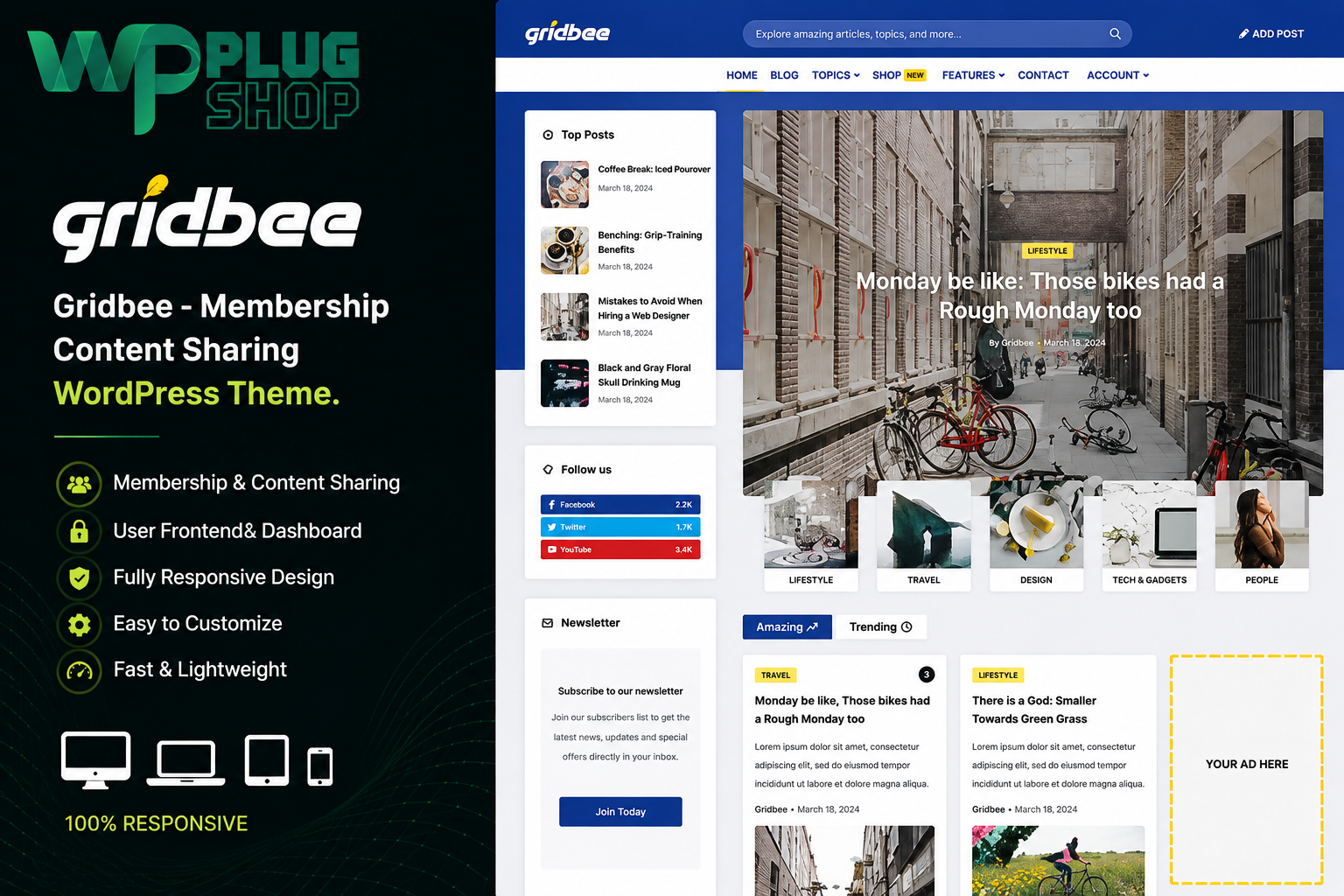
Preview Gridbee Content Sharing WordPress Theme – User-Generated Content
View the product artwork, switch gallery images, and open a larger preview before checkout.
Get secure digital access for real WordPress projects
This section summarizes the buying experience and what customers can expect after checkout.
Product overview, benefits, and digital access details
Review the key product details, practical use cases, and digital access information before checkout.
Frequently Asked Questions
What is Gridbee Content Sharing WordPress Theme?
Gridbee is a WordPress theme designed for content-sharing websites, user-generated content platforms, community publishing websites, magazines, blogs, and other projects where users can contribute and share content.
Can users submit posts from the frontend with Gridbee?
Yes. Gridbee is designed around frontend content submission, allowing registered users to create and manage posts without needing to work directly from the standard WordPress administration dashboard.
Can users edit or delete their submitted posts?
Yes. Gridbee provides frontend post management functionality that can allow users to view, edit, and delete their own submitted content, depending on the configured submission permissions and website workflow.
Is Gridbee suitable for user-generated content websites?
Yes. User-generated content is one of Gridbee's primary use cases. The theme is suitable for community websites, content-sharing platforms, niche publishing sites, magazines, blogs, recipe websites, and other projects that accept contributions from registered users.
Can I create frontend submission forms with Gridbee?
Yes. Gridbee supports frontend submission forms and provides options for creating and configuring multiple submission forms. This makes it possible to design different content-submission workflows for different types of user-generated content.
Is Gridbee suitable for a community website?
Yes. Gridbee can be used as a foundation for a community-driven WordPress website where registered members contribute articles, posts, images, recipes, or other types of content. Additional WordPress plugins can be used when your project requires specialized community or membership functionality.
Can Gridbee be used for a magazine or viral content website?
Yes. Gridbee is suitable for magazine-style, viral-content, blog, and content-discovery websites. Its grid, masonry, and content-focused layouts can help organize and showcase a large collection of user and administrator-published posts.
Does Gridbee support WooCommerce?
Yes. Gridbee includes WooCommerce compatibility, making it possible to combine a content-sharing website with an online store. WooCommerce can provide ecommerce functionality while Gridbee handles the site's content-focused presentation.
Does Gridbee support custom post types and taxonomies?
Yes. Gridbee supports custom post types and custom taxonomies, giving website owners greater flexibility when organizing different types of user-generated or editorial content.
Can Gridbee be used for a recipe or food-sharing website?
Yes. Recipe and food-sharing websites are suitable use cases for Gridbee because users can contribute content through frontend submission workflows while the website presents posts using content-focused layouts and discovery features.
Does Gridbee support infinite scrolling and grid layouts?
Yes. Gridbee includes content presentation options such as grid, masonry, Pinterest-style layouts, pagination, and infinite scrolling, helping visitors browse larger collections of published content more efficiently.
Is Gridbee an LMS or membership plugin?
No. Gridbee is primarily a WordPress theme focused on content sharing and frontend publishing. If your website needs advanced membership, community, learning management, or other specialized functionality, an appropriate WordPress plugin can be added where compatible.
Frequently Asked Questions
What is Gridbee Content Sharing WordPress Theme?
Gridbee is a WordPress theme designed for building content-sharing, user-generated content, community publishing, magazine, blog, and niche content websites. It provides tools and layouts for websites where administrators and registered users can publish and manage content.
Can users submit content from the frontend with Gridbee?
Yes. Gridbee supports frontend content submission, allowing registered users to create content without needing direct access to the standard WordPress dashboard. This makes it suitable for community publishing and user-generated content websites.
Can users edit and manage their submitted posts?
Yes. Gridbee provides frontend post-management functionality that can allow users to view, edit, and delete their submitted posts, subject to the permissions and publishing workflow configured by the website administrator.
Is Gridbee a good theme for user-generated content websites?
Yes. User-generated content is a core use case for Gridbee. It can be used for community websites, content-sharing platforms, niche publishing websites, recipe communities, magazines, blogs, and other websites that accept contributions from registered users.
Can I create multiple frontend submission forms with Gridbee?
Yes. Gridbee supports multiple frontend submission forms with configurable options and restrictions. This can help website owners create different submission workflows for different content types or community publishing requirements.
Can Gridbee be used for a community content-sharing website?
Yes. Gridbee provides a suitable WordPress foundation for community-driven websites where registered members contribute articles, posts, images, recipes, or other content. Additional WordPress plugins can be used when advanced membership or community features are required.
Is Gridbee suitable for magazine and viral content websites?
Yes. Gridbee is suitable for magazine-style, viral-content, blog, and content-discovery websites. Grid, masonry, and Pinterest-style layouts can help organize and display large collections of published content in an engaging format.
Does Gridbee support WooCommerce?
Yes. Gridbee supports WooCommerce, allowing a content-sharing website to incorporate ecommerce functionality. WooCommerce can handle the online store while Gridbee provides the content-focused website design and publishing environment.
Does Gridbee support custom post types and taxonomies?
Yes. Gridbee supports custom post types and custom taxonomies, providing flexibility for organizing different types of editorial, community, or user-generated content.
Can I use Gridbee for a recipe-sharing website?
Yes. Recipe and food-sharing websites are suitable Gridbee use cases. Visitors or registered contributors can submit content through frontend workflows, while grid and masonry layouts can be used to present recipes and other posts.
Does Gridbee support grid, masonry, and infinite-scroll layouts?
Yes. Gridbee includes content presentation options such as grid layouts, masonry layouts, Pinterest-style layouts, standard pagination, and infinite scrolling to help visitors browse content collections.
Is Gridbee an LMS or membership plugin?
No. Gridbee is primarily a content-sharing and frontend-publishing WordPress theme. Websites requiring advanced membership, social-community, learning-management, or other specialized functionality may need compatible WordPress plugins.
Frequently Asked Questions
What is Gridbee Content Sharing WordPress Theme?
Gridbee is a specialized WordPress theme for creating content-sharing websites, user-generated content platforms, community publishing websites, magazines, blogs, and niche content communities. It provides a frontend-oriented publishing environment for websites where administrators and registered users can contribute content.
Can users submit posts from the frontend with Gridbee?
Yes. Gridbee supports frontend post submission, allowing registered users to create content without requiring direct access to the standard WordPress dashboard. This makes it useful for community publishing and user-generated content websites.
Can users edit or delete their own submitted posts?
Yes. Gridbee includes frontend post-management functionality that can allow users to view, edit, and delete their submitted content, depending on the permissions and publishing rules configured by the website administrator.
Is Gridbee suitable for user-generated content websites?
Yes. User-generated content is one of Gridbee's primary use cases. The theme can be used for community websites, content-sharing platforms, recipe websites, magazines, blogs, niche publishing projects, and other websites that accept content contributions from registered users.
Can I create frontend submission forms with Gridbee?
Yes. Gridbee supports frontend submission forms with configurable options and restrictions. Multiple forms can be useful when a website accepts different types of user-generated content or requires separate publishing workflows.
Can Gridbee be used to build a community content-sharing website?
Yes. Gridbee provides a suitable WordPress foundation for community-driven publishing websites where registered members can contribute articles, posts, images, recipes, and other content. Compatible WordPress plugins can be added when advanced membership or community functionality is required.
Is Gridbee suitable for magazine and viral content websites?
Yes. Gridbee can be used for magazine-style websites, viral content platforms, blogs, and content-discovery websites. Its grid, masonry, and Pinterest-style presentation options can help organize and showcase larger collections of published content.
Does Gridbee support WooCommerce?
Yes. Gridbee supports WooCommerce, allowing you to combine a content-sharing website with an online store. WooCommerce can provide ecommerce functionality while Gridbee provides the content-focused WordPress theme and publishing environment.
Does Gridbee support custom post types and taxonomies?
Yes. Gridbee supports custom post types and custom taxonomies, providing additional flexibility for organizing different categories of editorial, community, and user-generated content.
Can Gridbee be used for a recipe-sharing website?
Yes. Recipe and food-sharing websites are suitable use cases for Gridbee. Registered contributors can submit content through frontend workflows, while grid and masonry layouts can help display recipes and other community posts.
Does Gridbee support grid, masonry, and infinite-scroll layouts?
Yes. Gridbee provides several content-display options, including grid layouts, masonry layouts, Pinterest-style layouts, standard pagination, and infinite scrolling for browsing content collections.
Is Gridbee an LMS or membership plugin?
No. Gridbee is primarily a content-sharing and frontend-publishing WordPress theme. If your website requires advanced membership, social-community, learning-management, or other specialized functionality, you may need to add compatible WordPress plugins.
Quick product answers for buyers and AI search
Clear product answers help buyers, search engines, and AI answer engines understand this product faster.
Best ways to use this WordPress digital product
These use cases help buyers quickly decide if this product fits their workflow.
How digital access works
No physical shipping is required. This is a digital product access purchase designed for account-based downloads.
Secure payment options for digital checkout
WPPlugShop supports trusted checkout options so buyers can complete digital purchases with more confidence.
Frequently asked questions
Buyer-focused answers about digital access, secure payments, downloads, support, and product usage.
Related WordPress tools you may also like
Explore related WordPress tools that may support the same workflow, website type, or project goal.


Choose the right WordPress tool with confidence
Request a product, explore membership access, or contact support if you want help choosing the right WordPress digital product before checkout.