
HT Team Member For Elementor – WordPress Team Showcase Plugin
Verified from VirusTotal 100% Original Product and Virus Free. Free New Version Lifetime On Single Purchase. Unlimited Website Usage Price is in US dollars and included tax
Buy confidently with secure digital checkout, account-based downloads, and a cleaner WPPlugShop product experience.
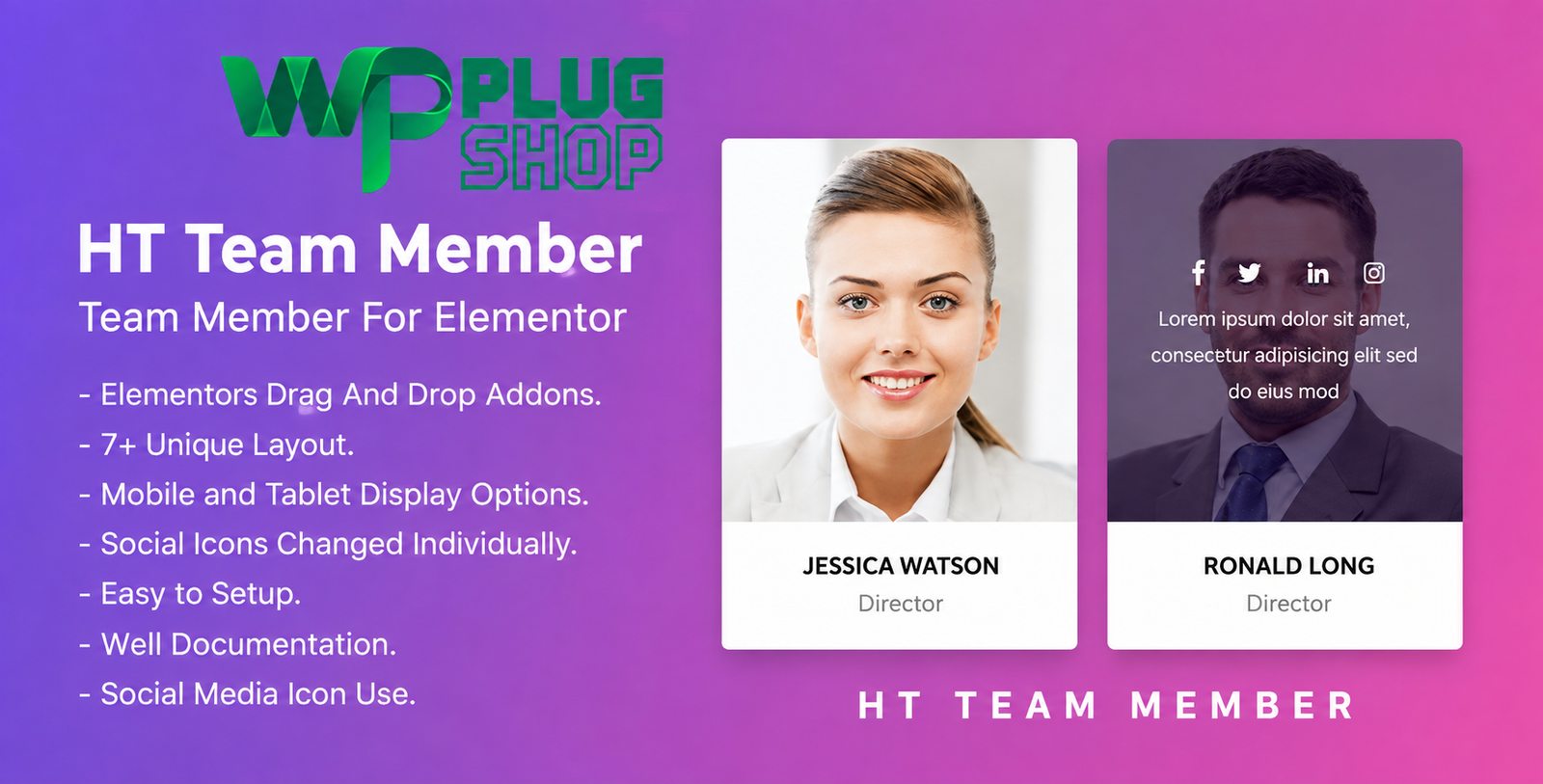
Preview HT Team Member For Elementor – WordPress Team Showcase Plugin
View the product artwork, switch gallery images, and open a larger preview before checkout.
Get secure digital access for real WordPress projects
This section summarizes the buying experience and what customers can expect after checkout.
Product overview, benefits, and digital access details
Review the key product details, practical use cases, and digital access information before checkout.
HT Team Member For Elementor – WordPress Team Showcase Plugin
Create a professional team section for your WordPress website with HT Team Member For Elementor. Designed for Elementor-powered websites, this team showcase plugin provides multiple ready-made team styles, responsive display controls, social media options, and flexible styling settings to help you present team members in a clean and organized way.
Whether you are building an agency website, corporate website, startup site, creative portfolio, consulting website, or professional services website, HT Team Member For Elementor gives you practical tools for creating attractive team member profiles without having to design every team card from scratch.
Create Professional Team Member Showcases
Displaying your people clearly can make an important part of a business website easier to organize. HT Team Member For Elementor lets you create team profiles containing a member's image or avatar, name, designation, description, and social links.
The plugin includes 7+ preset team member styles, giving you different layout options for presenting staff and team profiles. You can select a suitable style and customize its appearance through Elementor-oriented settings.
Why Use HT Team Member For Elementor?
- Create dedicated team member sections in Elementor.
- Choose from 7+ preset team member design styles.
- Create and manage multiple team members.
- Present names, designations, descriptions, images, and social links.
- Customize colors, typography, and team styling.
- Control the number of members displayed.
- Use mobile and tablet display options.
- Create responsive team showcases for different screen sizes.
- Use pre-designed layouts to speed up team-section creation.
- Add visual animation effects where appropriate.
7+ Preset Team Member Styles
HT Team Member For Elementor includes 7+ preset team member styles that can help you create different visual presentations for your staff profiles. Instead of relying on a single team-card design, you can select a layout that fits the structure and style of your website.
This makes the plugin useful for websites that need a dedicated Meet the Team, staff, employee, partner, or team showcase section.
Flexible Team Member Information
Build individual team profiles with the information visitors need to understand who is behind your business or organization.
- Team Member Image/Avatar: Add a visual profile image for each member.
- Name: Display the team member's name clearly.
- Designation: Show the person's role or position.
- Description: Add a short professional biography or introduction.
- Social Links: Provide social media connections where required.
Customize Team Member Styling
Give your team section a visual style that matches the rest of your WordPress website. The plugin provides customization options for colors, font sizes, font families, team styles, and other presentation settings.
You can customize elements such as:
- Team member name color
- Designation color
- Description color
- Social link color
- Name font size
- Designation font size
- Description font size
- Team styles
- Other available Elementor styling options
Responsive Team Showcase
A modern team section needs to work across different screen sizes. HT Team Member For Elementor includes responsive and mobile-friendly display options, along with mobile and tablet controls, helping you manage how team content appears on smaller devices.
This makes the plugin suitable for responsive business websites where visitors may browse team profiles from desktops, tablets, or smartphones.
Social Media Profile Links
Make it easier for visitors to discover relevant social profiles by adding social media icons to team member presentations. Social links can be integrated into the team profile design alongside the member's image, name, designation, and description.
This can be particularly useful for agencies, creative professionals, consultants, startups, corporate teams, and organizations that want to provide additional ways for visitors to connect with individual team members.
Manage Team Members Easily
Team information can change as your website grows. HT Team Member For Elementor provides options to add, edit, and delete team members, helping you keep your team showcase organized.
You can create and design multiple team members and control how many members are displayed within your chosen presentation.
Product Details
| Product | HT Team Member For Elementor |
|---|---|
| Product Type | WordPress Team Member Showcase Plugin |
| Primary Builder | Elementor |
| Team Styles | 7+ Preset Styles |
| Responsive | Yes |
| Mobile Controls | Yes |
| Tablet Controls | Yes |
| Social Media Icons | Yes |
| Team Member Management | Add, Edit, Delete |
| Team Member Information | Image, Name, Designation, Description |
| Typography Controls | Font Size and Font Family Options |
| Color Controls | Multiple Team Element Color Options |
| Display Control | Select Number of Members to Display |
| Animation | Animation Effects Available |
| Layout | Pre-designed Team Layouts |
Feature Comparison
| Capability | HT Team Member For Elementor | Manual Team Section Design |
|---|---|---|
| Ready-made team styles | 7+ preset styles | Requires manual design |
| Elementor workflow | Designed for Elementor | Depends on manual Elementor setup |
| Team member fields | Image, name, designation, description | Must be created manually |
| Social links | Available | Requires manual setup |
| Responsive controls | Mobile and tablet options | Requires manual configuration |
| Typography controls | Available | Manual styling required |
| Color customization | Available | Manual styling required |
Who Is HT Team Member For Elementor For?
Agencies: Present designers, developers, marketers, and other agency professionals in a dedicated team section.
Corporate Websites: Organize employee and department profiles into a professional team showcase.
Startups: Introduce founders and team members on a dedicated company website.
Creative Studios: Showcase designers, developers, photographers, artists, and creative professionals.
Consulting Websites: Present consultants and specialists with their roles and professional descriptions.
Professional Services: Build a structured team section for businesses that rely on people and expertise.
Portfolio Websites: Introduce collaborators, partners, or project team members.
Build a Better “Meet the Team” Section
A well-organized team section can make your website feel more complete and help visitors understand the people working behind a business or organization. With multiple layouts and customization controls, HT Team Member For Elementor provides a practical way to create a dedicated WordPress team showcase using Elementor.
Responsive Layout Controls for Different Devices
Different screen sizes require different presentation choices. The plugin includes mobile and tablet display options so you can manage the team showcase for smaller screens while maintaining a consistent presentation across devices.
Pros and Considerations
| Pros | Considerations |
|---|---|
| 7+ preset team member styles | Designed specifically around the Elementor workflow |
| Responsive and mobile-friendly options | Current compatibility should be checked before installation on newer environments |
| Multiple styling controls | Feature availability depends on the included plugin version |
| Social media icons | Social networks should be configured according to your website requirements |
| Add, edit, and delete team members | Team information still needs to be maintained by the site administrator |
| Pre-designed team layouts | Very advanced custom layouts may still require additional Elementor design work |
Why It Fits Elementor Websites
For Elementor users who need a dedicated team member widget or team showcase solution, HT Team Member For Elementor focuses specifically on presenting team information. Instead of treating team profiles as generic content blocks, it provides purpose-built team layouts and styling controls.
This makes it a useful resource for WordPress websites where the team itself is an important part of the brand, service, or organization.
Important Compatibility Note
The original marketplace listing documents compatibility with Elementor and Elementor Pro and lists older WordPress and WooCommerce versions. Its latest documented update on that listing is version 1.0.5 from May 31, 2022. Therefore, compatibility with the latest WordPress and Elementor releases should be verified in your intended environment before deployment. :contentReference[oaicite:1]{index=1}
Final Takeaway
HT Team Member For Elementor is a focused WordPress team showcase solution for Elementor websites that need flexible team-member layouts, responsive presentation, social links, and customizable styling. With 7+ preset designs and controls for team information, colors, typography, and display settings, it can help agencies, companies, startups, and professional websites create structured “Meet the Team” sections more efficiently.
Choose this WordPress team showcase plugin when your goal is to create organized, responsive, and customizable team-member presentations within an Elementor-based website.
Frequently Asked Questions About HT Team Member For Elementor
What is HT Team Member For Elementor?
HT Team Member For Elementor is a WordPress team showcase plugin designed for Elementor websites. It provides multiple team-member layouts, responsive controls, social media icons, and styling options for creating professional team sections.
How many team member styles are included?
The plugin includes 7+ preset team member design styles, giving you multiple ways to present staff, employees, partners, or other team profiles on an Elementor website.
Can I use HT Team Member For Elementor with Elementor?
Yes. The product is specifically designed around the Elementor workflow and includes Elementor-based customization options for team member layouts and styling.
Can I create multiple team members?
Yes. The product documentation states that you can create and design unlimited team members, making it suitable for small teams as well as larger staff or organization pages.
Can I customize team member information?
Yes. Team member profiles can include information such as an image or avatar, name, designation, and description. Team members can also be added, edited, or deleted as your website content changes.
Does HT Team Member For Elementor support responsive layouts?
Yes. The plugin includes responsive and mobile-friendly functionality, with mobile and tablet display options for managing how team content appears across different screen sizes.
Can I add social media icons to team members?
Yes. Social media icons are included, allowing you to provide social profile links alongside individual team member information.
Can I change fonts and colors?
Yes. The documented customization options include colors, font sizes, font families, and other team styling controls. Options are available for elements such as names, designations, descriptions, and social links.
Is HT Team Member For Elementor suitable for agency and business websites?
Yes. The plugin can be useful for agencies, companies, startups, creative studios, consultants, and professional service websites that need a dedicated team or “Meet the Team” showcase.
Is HT Team Member For Elementor compatible with the latest WordPress and Elementor versions?
The original product listing records compatibility with WordPress versions through 6.2.x and documents a last update of May 31, 2022. Because current WordPress and Elementor releases may be newer, compatibility should be verified in your intended environment before deployment.
Can I control how many team members are displayed?
Yes. The product documentation includes an option to select how many team members are displayed within the team showcase.
Does the plugin include pre-designed team layouts?
Yes. HT Team Member For Elementor includes pre-designed layouts and 7+ preset team member styles, helping you create team showcases without designing every layout from the beginning.
Can I change individual team member styling?
Yes. The documented settings include controls for team member names, designations, descriptions, colors, font sizes, social link colors, and team styles.
Is HT Team Member For Elementor a WooCommerce plugin?
No. It is primarily a WordPress team showcase plugin for Elementor. The original marketplace listing also identifies compatibility with certain WooCommerce versions, but its core purpose is creating team-member presentations rather than adding WooCommerce functionality.
Who should use HT Team Member For Elementor?
It is suited to WordPress users who need an Elementor-based team showcase, including agencies, corporate websites, startups, creative businesses, consultants, professional services, and organizations that want to present team members in structured layouts.
Quick product answers for buyers and AI search
Clear product answers help buyers, search engines, and AI answer engines understand this product faster.
Best ways to use this WordPress digital product
These use cases help buyers quickly decide if this product fits their workflow.
How digital access works
No physical shipping is required. This is a digital product access purchase designed for account-based downloads.
Secure payment options for digital checkout
WPPlugShop supports trusted checkout options so buyers can complete digital purchases with more confidence.
Frequently asked questions
Buyer-focused answers about digital access, secure payments, downloads, support, and product usage.
Related WordPress tools you may also like
Explore related WordPress tools that may support the same workflow, website type, or project goal.




Choose the right WordPress tool with confidence
Request a product, explore membership access, or contact support if you want help choosing the right WordPress digital product before checkout.