
Wicked Folders Pro – WordPress Admin & Media Organization Plugin
Verified from VirusTotal 100% Original Product and Virus Free. Free New Version Lifetime On Single Purchase. Unlimited Website Usage Price is in US dollars and included tax
Buy confidently with secure digital checkout, account-based downloads, and a cleaner WPPlugShop product experience.
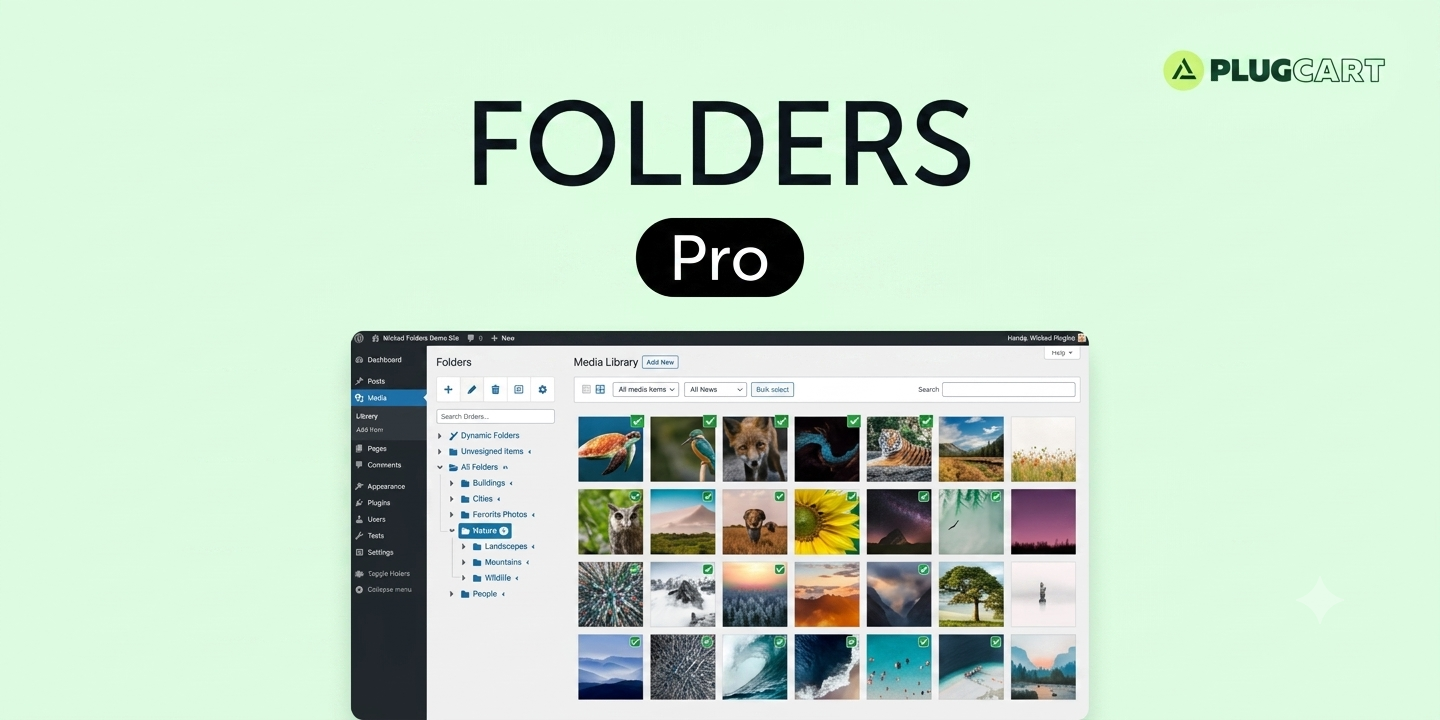
Preview Wicked Folders Pro – WordPress Admin & Media Organization Plugin
View the product artwork, switch gallery images, and open a larger preview before checkout.
Get secure digital access for real WordPress projects
This section summarizes the buying experience and what customers can expect after checkout.
Product overview, benefits, and digital access details
Review the key product details, practical use cases, and digital access information before checkout.
Product Overview
Wicked Folders Pro is a powerful WordPress admin organization plugin designed to bring structure and clarity to your backend workspace. It introduces a virtual folder system that allows you to organize posts, pages, media files, custom post types, and WooCommerce data without changing your website structure.
Instead of dealing with cluttered lists inside the WordPress dashboard, Wicked Folders Pro gives you a clean, folder-based interface that improves workflow speed, productivity, and content management efficiency.
Why This Product Is Useful
As WordPress websites grow, the admin dashboard becomes increasingly difficult to manage. Thousands of posts, products, and media files create chaos. Wicked Folders Pro solves this by adding an intuitive organizational layer on top of WordPress.
- Eliminates backend clutter in WordPress
- Improves content accessibility and navigation
- Speeds up workflow for content teams and agencies
- Enables scalable content management for large sites
Key Features
- Virtual folder system for WordPress admin content
- Drag and drop content organization
- Support for posts, pages, and custom post types
- Media library folder organization (Pro features)
- WooCommerce product, order, and coupon organization
- Nested folder hierarchy for advanced structure
- Bulk move and organize items into folders
- Dynamic folders based on filters (category, author, date)
- Fast search inside folders for quick access
- Multisite compatibility for agency workflows
Main Benefits
- Improves WordPress admin productivity
- Reduces time spent searching for content
- Enhances workflow efficiency for teams and agencies
- Scales easily for large content and WooCommerce stores
- Creates a clean, structured backend environment
Best Use Cases
- Large content blogs and news portals
- WooCommerce stores with many products
- Agencies managing multiple client websites
- Membership sites with structured content libraries
- Media-heavy websites with large asset libraries
Who Should Use This Product?
- WordPress developers and administrators
- Digital agencies managing multiple projects
- WooCommerce store owners
- Content managers and SEO teams
- Website owners with large-scale content libraries
WP Plug Shop Access Benefits
- Affordable access to premium WordPress admin tools
- Instant digital download after purchase
- GPL-friendly distribution model
- Perfect for freelancers, agencies, and developers
- Ready-to-use plugin files for immediate deployment
Product Details
| Attribute | Details |
|---|---|
| Product Name | Wicked Folders Pro |
| Category | WordPress Admin Organization Plugin |
| Function | Virtual folder-based content management |
| Supported Content | Posts, Pages, Media, WooCommerce, CPTs |
| Type | Backend workflow optimization tool |
Feature Comparison
| Feature | Default WordPress Admin | Wicked Folders Pro |
|---|---|---|
| Content Organization | Flat list structure | Virtual folder system |
| Media Management | Basic media library | Folder-based organization |
| WooCommerce Management | Unstructured lists | Organized product/order folders |
| Workflow Efficiency | Manual navigation required | Fast drag-and-drop system |
| Scalability | Becomes cluttered at scale | Optimized for large sites |
Pros and Considerations
| Pros | Considerations |
|---|---|
| Highly improves admin workflow efficiency | Advanced features available in Pro version |
| Works with multiple content types | Requires initial folder setup for best results |
| Ideal for agencies and large websites | Not necessary for very small sites |
| No changes to frontend URLs | Admin-only organizational layer |
Final Verdict
Wicked Folders Pro is an essential productivity tool for WordPress users managing large or complex websites. By introducing a virtual folder system to the admin dashboard, it dramatically improves organization, workflow speed, and content accessibility without affecting site structure or performance.
Frequently Asked Questions
What is Wicked Folders Pro used for?
It is used to organize WordPress admin content such as posts, pages, media files, and WooCommerce items into a virtual folder structure for better management.
Does Wicked Folders Pro change my website URLs?
No, it only affects the WordPress admin interface. Your frontend URLs and site structure remain unchanged.
Can I organize WooCommerce products with this plugin?
Yes, it supports organizing WooCommerce products, orders, and coupons into folders for easier store management.
Does it work with the media library?
Yes, the Pro version allows you to organize media files into folders inside the WordPress media library.
Is this plugin suitable for large websites?
Yes, it is designed specifically for large content-heavy websites, agencies, and WooCommerce stores that need better backend organization.
Can I create nested folders?
Yes, you can create folder hierarchies (subfolders) to build a structured content organization system.
Does it support custom post types?
Yes, it works with custom post types, making it useful for advanced WordPress setups and plugins.
Will it slow down my WordPress site?
No, it is optimized to work efficiently within the WordPress admin and does not affect frontend performance.
Is it beginner-friendly?
Yes, the interface is simple and drag-and-drop based, making it easy for beginners to organize content quickly.
Why should I use a folder plugin for WordPress?
Because it dramatically improves productivity, reduces time spent searching for content, and keeps large WordPress sites organized and scalable.
Quick product answers for buyers and AI search
Clear product answers help buyers, search engines, and AI answer engines understand this product faster.
Best ways to use this WordPress digital product
These use cases help buyers quickly decide if this product fits their workflow.
How digital access works
No physical shipping is required. This is a digital product access purchase designed for account-based downloads.
Secure payment options for digital checkout
WPPlugShop supports trusted checkout options so buyers can complete digital purchases with more confidence.
Frequently asked questions
Buyer-focused answers about digital access, secure payments, downloads, support, and product usage.
Related WordPress tools you may also like
Explore related WordPress tools that may support the same workflow, website type, or project goal.


Choose the right WordPress tool with confidence
Request a product, explore membership access, or contact support if you want help choosing the right WordPress digital product before checkout.