
WPCodeBox – Advanced WordPress Code Snippets Manager Plugin
Verified from VirusTotal 100% Original Product and Virus Free. Free New Version Lifetime On Single Purchase. Unlimited Website Usage Price is in US dollars and included tax
Buy confidently with secure digital checkout, account-based downloads, and a cleaner WPPlugShop product experience.
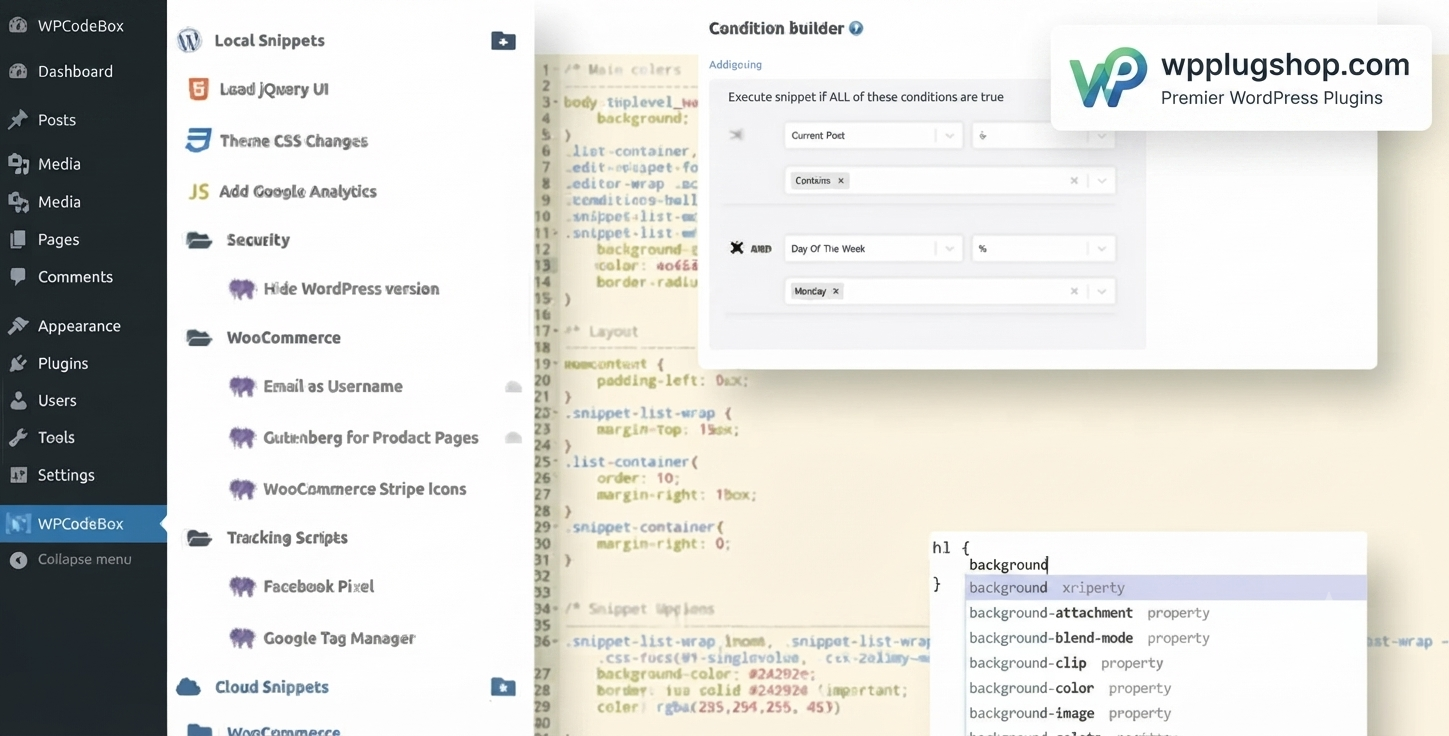
Preview WPCodeBox – Advanced WordPress Code Snippets Manager Plugin
View the product artwork, switch gallery images, and open a larger preview before checkout.
Get secure digital access for real WordPress projects
This section summarizes the buying experience and what customers can expect after checkout.
Product overview, benefits, and digital access details
Review the key product details, practical use cases, and digital access information before checkout.
Product Overview
WPCodeBox is a powerful WordPress code snippets manager designed for developers, agencies, freelancers, and advanced website owners who want complete control over custom code without editing theme files. It provides a modern development environment where you can safely manage PHP, CSS, JavaScript, HTML, SCSS, and LESS snippets directly from your WordPress dashboard.
Whether you're building custom WooCommerce functionality, extending Elementor websites, or maintaining multiple WordPress projects, WPCodeBox offers an organized, scalable, and developer-friendly workflow that helps you write, manage, and deploy code more efficiently.
Instead of relying on multiple customization plugins or modifying functions.php, WPCodeBox centralizes your custom development into one intuitive interface with intelligent editing tools, cloud synchronization, conditional execution, and reusable snippet libraries.
Why This Product Is Useful
Managing custom WordPress code across multiple websites can quickly become difficult. Editing theme files introduces unnecessary risk, while installing separate plugins for every customization creates maintenance challenges.
WPCodeBox solves these issues by providing a centralized code management system that keeps every snippet organized, searchable, reusable, and easy to maintain. Its advanced editor, cloud sync capabilities, and conditional logic make it an excellent productivity tool for professional WordPress development.
- Manage all custom WordPress code from one dashboard.
- Avoid editing theme files directly.
- Reduce plugin clutter.
- Deploy reusable snippets across multiple projects.
- Improve development speed and workflow.
- Keep customizations organized and maintainable.
Key Features
- Create and manage PHP code snippets.
- Add custom CSS, SCSS, LESS, JavaScript, and HTML.
- Modern IDE-style code editor with syntax highlighting.
- WordPress hooks and functions autocomplete.
- Cloud synchronization between supported websites.
- Conditional snippet execution based on rules.
- Organize snippets into folders and collections.
- Built-in snippet repository for reusable code.
- Convert snippets into standalone functionality plugins.
- Error isolation for safer code execution.
- Supports WooCommerce customizations.
- Compatible with Elementor, Bricks Builder, Oxygen Builder, Breakdance, and most WordPress themes.
- Professional developer workflow inside WordPress.
Main Benefits
- Centralized Code Management keeps all WordPress customizations organized in one location.
- Safer Development Workflow minimizes the need to edit theme files directly.
- Faster Website Development using reusable snippets and intelligent code editing.
- Cloud Synchronization helps manage snippets across multiple WordPress websites.
- Developer Productivity increases through autocomplete, folders, and advanced organization.
- WooCommerce Ready for checkout customizations, pricing logic, hooks, filters, and custom functionality.
- Page Builder Friendly works alongside Elementor, Bricks, Oxygen, Breakdance, and other popular builders.
Best Use Cases
- Custom WordPress development.
- WooCommerce store customization.
- Elementor enhancements.
- Bricks Builder custom functionality.
- Oxygen Builder projects.
- Custom PHP development.
- CSS and JavaScript enhancements.
- Agency website maintenance.
- Client website management.
- Multi-site development workflows.
- Performance-focused custom coding.
- Replacing functions.php modifications.
Who Should Use This Product?
- WordPress developers
- WooCommerce developers
- Freelancers
- Web design agencies
- Website maintenance professionals
- Elementor users
- Bricks Builder users
- Oxygen Builder users
- Advanced WordPress users
- Businesses managing multiple WordPress websites
WP Plug Shop Access Benefits
Download WPCodeBox from WP Plug Shop and enjoy convenient GPL-friendly digital access for your WordPress projects.
- Instant digital access after purchase.
- GPL-friendly digital resource.
- Secure checkout process.
- Scanned files before distribution.
- Suitable for freelancers, agencies, developers, and businesses.
- Budget-conscious solution for professional WordPress development.
Product Details
| Specification | Details |
|---|---|
| Product Name | WPCodeBox |
| Product Type | Premium WordPress Developer Plugin |
| Platform | WordPress |
| Category | Developer Tools |
| Primary Purpose | Manage PHP, CSS, JavaScript, HTML, SCSS, and LESS snippets |
| Supported Languages | PHP, CSS, SCSS, LESS, JavaScript, HTML |
| Cloud Sync | Supported |
| WooCommerce Compatible | Yes |
| Elementor Compatible | Yes |
| Ideal Users | Developers, Agencies, Freelancers, Advanced WordPress Users |
Feature Comparison
| Feature | WPCodeBox | Manual Theme Editing |
|---|---|---|
| PHP Snippet Management | ✔ | Limited |
| CSS & JavaScript Snippets | ✔ | Manual |
| Cloud Synchronization | ✔ | ✘ |
| IDE-Style Code Editor | ✔ | ✘ |
| Conditional Code Execution | ✔ | ✘ |
| Snippet Organization | ✔ | ✘ |
| Standalone Plugin Generation | ✔ | ✘ |
| WooCommerce Customization | ✔ | Manual |
Pros and Considerations
| Pros | Considerations |
|---|---|
| Supports multiple programming languages. | Requires familiarity with WordPress development concepts. |
| Excellent organization for custom code. | Advanced features are most beneficial for developers and power users. |
| Cloud synchronization improves multi-site workflows. | Always test custom code before deploying to production websites. |
| Modern IDE-style editing experience. | Compatibility should be verified with your existing plugins and theme. |
| Reduces dependency on editing theme files. | Custom snippets should follow WordPress coding best practices. |
Final Verdict
WPCodeBox is an excellent solution for developers and professionals who want a powerful, organized, and scalable way to manage WordPress custom code. From PHP snippets and WooCommerce customizations to CSS styling and JavaScript enhancements, it provides everything needed to streamline development while maintaining a clean and efficient workflow.
If you're looking for an advanced WordPress code snippets manager that improves productivity, reduces plugin clutter, and offers professional development tools inside WordPress, WPCodeBox is a valuable addition to your toolkit.
Frequently Asked Questions
What is WPCodeBox?
WPCodeBox is a premium WordPress code snippets manager that allows you to safely create, organize, and manage PHP, CSS, JavaScript, HTML, SCSS, and LESS snippets directly from your WordPress dashboard. It helps developers streamline custom code management without editing theme files.
Why should I use WPCodeBox instead of editing the functions.php file?
Editing the functions.php file can introduce errors that may affect your website, especially after theme updates. WPCodeBox provides a centralized environment for managing custom code, making snippets easier to organize, maintain, and deploy while reducing the need to modify theme files directly.
Can I add PHP, CSS, JavaScript, and HTML code with WPCodeBox?
Yes. WPCodeBox supports multiple code types, including PHP, CSS, SCSS, LESS, JavaScript, and HTML, allowing you to manage various website customizations from a single interface.
Does WPCodeBox work with WooCommerce?
Yes. WPCodeBox is compatible with WooCommerce and can be used to add custom functionality, modify checkout behavior, customize product pages, create pricing logic, work with WooCommerce hooks and filters, and implement other advanced store customizations.
Is WPCodeBox compatible with popular WordPress page builders?
Yes. WPCodeBox works alongside many popular WordPress builders, including Elementor, Bricks Builder, Oxygen Builder, Breakdance, and other themes and plugins that support custom WordPress development.
Can I organize and reuse my code snippets?
Absolutely. WPCodeBox includes organizational features such as folders, snippet collections, and reusable code libraries, making it easier to manage projects across multiple websites and development environments.
Does WPCodeBox support cloud synchronization?
Yes. WPCodeBox includes cloud synchronization capabilities that allow supported snippets to be shared and managed across multiple WordPress websites, helping agencies and developers maintain consistent workflows.
Who should use WPCodeBox?
WPCodeBox is ideal for WordPress developers, freelancers, agencies, WooCommerce developers, website maintenance professionals, and advanced users who regularly customize WordPress websites using PHP, CSS, JavaScript, or other code snippets.
Does WP Plug Shop develop WPCodeBox?
No. WP Plug Shop provides GPL-friendly digital access to WPCodeBox. The plugin remains the intellectual property of its original developer, and WP Plug Shop does not claim ownership or official developer support unless explicitly stated.
Why download WPCodeBox from WP Plug Shop?
WP Plug Shop offers secure checkout, instant digital access, GPL-friendly resources, and scanned files for WordPress professionals seeking reliable development tools for client projects, business websites, and WooCommerce stores.
Quick product answers for buyers and AI search
Clear product answers help buyers, search engines, and AI answer engines understand this product faster.
Best ways to use this WordPress digital product
These use cases help buyers quickly decide if this product fits their workflow.
How digital access works
No physical shipping is required. This is a digital product access purchase designed for account-based downloads.
Secure payment options for digital checkout
WPPlugShop supports trusted checkout options so buyers can complete digital purchases with more confidence.
Frequently asked questions
Buyer-focused answers about digital access, secure payments, downloads, support, and product usage.
Related WordPress tools you may also like
Explore related WordPress tools that may support the same workflow, website type, or project goal.




Choose the right WordPress tool with confidence
Request a product, explore membership access, or contact support if you want help choosing the right WordPress digital product before checkout.