
Yellow Pencil Visual CSS Style Editor WordPress Plugin
Verified from VirusTotal 100% Original Product and Virus Free. Free New Version Lifetime On Single Purchase. Unlimited Website Usage Price is in US dollars and included tax
Buy confidently with secure digital checkout, account-based downloads, and a cleaner WPPlugShop product experience.
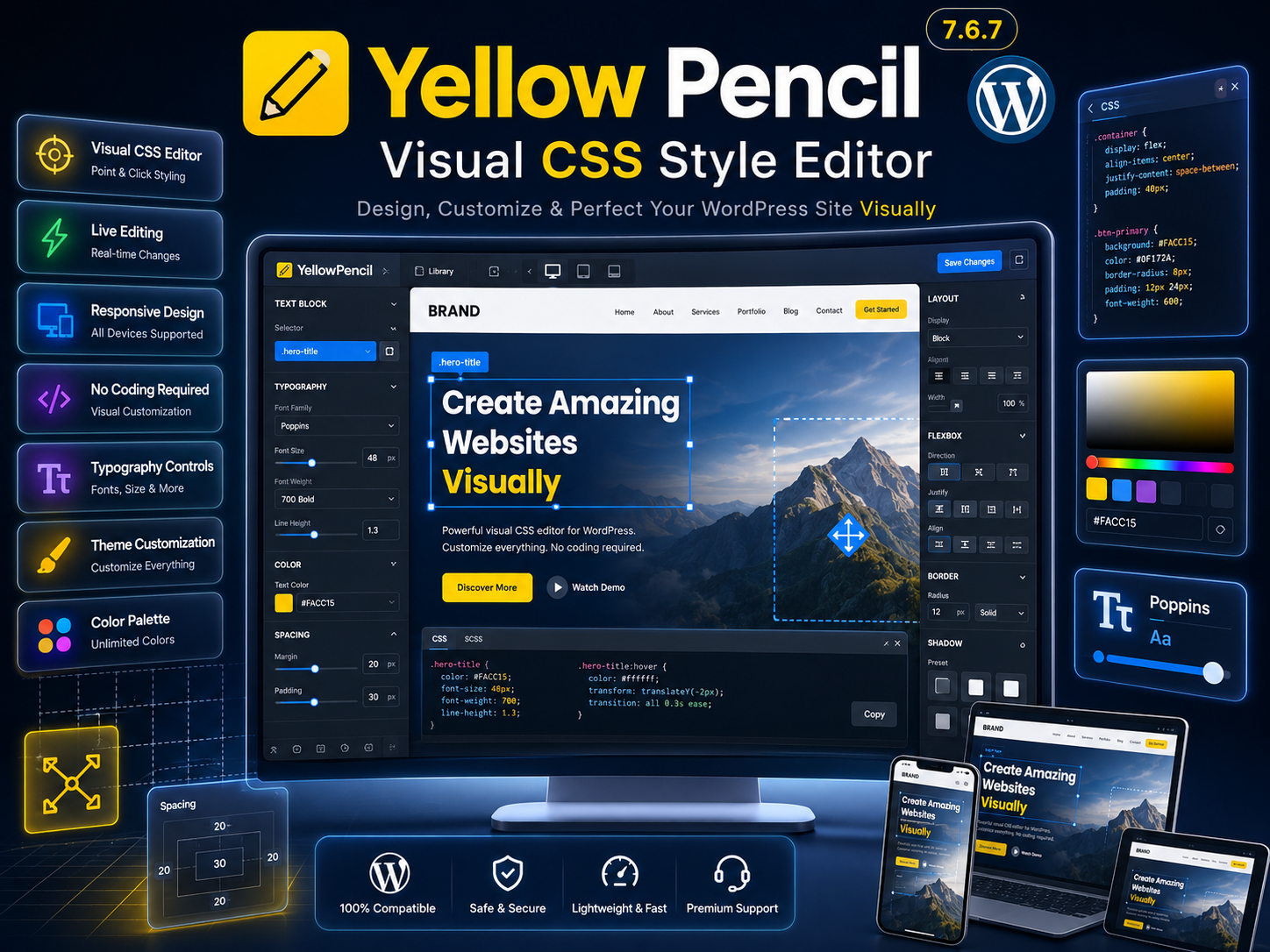
Preview Yellow Pencil Visual CSS Style Editor WordPress Plugin
View the product artwork, switch gallery images, and open a larger preview before checkout.
Get secure digital access for real WordPress projects
This section summarizes the buying experience and what customers can expect after checkout.
Product overview, benefits, and digital access details
Review the key product details, practical use cases, and digital access information before checkout.
Yellow Pencil Visual CSS Style Editor WordPress Plugin 7.6.7
Yellow Pencil 7.6.7 is a powerful visual CSS style editor for WordPress that allows users to customize website designs directly from the front end without writing code. Using a simple point-and-click interface, you can edit colors, typography, spacing, layouts, backgrounds, animations, and responsive settings while viewing changes in real time.
Designed for beginners, freelancers, agencies, designers, marketers, and developers, Yellow Pencil transforms WordPress design customization into a fast and intuitive visual experience. The plugin automatically generates CSS code behind the scenes, helping users create professional website designs without touching theme files.
Why Choose Yellow Pencil?
Traditional CSS customization often requires coding knowledge and repeated previewing. Yellow Pencil simplifies the entire process by providing live visual editing tools that allow you to modify any page element directly on the website.
- Edit website designs visually.
- No coding knowledge required.
- Customize themes and plugins.
- Generate CSS automatically.
- Create responsive layouts easily.
- Preview changes instantly.
- Improve design workflows.
- Save development time.
Core Features
- Visual front-end CSS editor.
- Point-and-click customization.
- Live design preview.
- Typography controls.
- Color customization.
- Spacing and layout editing.
- Animation effects.
- Responsive design controls.
- Background customization.
- Transform effects.
- Custom CSS support.
- Element inspection tools.
- CSS code generation.
- WooCommerce compatibility.
- Theme customization tools.
- No coding required.
Visual CSS Editing
Yellow Pencil enables users to edit any visible website element through an intuitive visual interface.
- Click and edit elements instantly.
- Live front-end editing.
- Visual customization controls.
- Immediate design feedback.
- Professional editing workflow.
- Easy style management.
Typography & Design Controls
Customize fonts, colors, spacing, and styling properties without manually editing CSS files.
- Font family selection.
- Font size adjustments.
- Text styling controls.
- Color management.
- Line-height settings.
- Letter spacing controls.
Responsive Design Editing
Create device-specific designs and optimize layouts for desktops, tablets, and smartphones.
- Mobile design controls.
- Tablet optimization.
- Desktop customization.
- Responsive previews.
- Device-specific styling.
- Cross-device consistency.
Advanced Styling Features
Apply professional design enhancements using advanced visual controls and styling options.
- Animations and transitions.
- Transform effects.
- Gradient backgrounds.
- Shadow controls.
- Border customization.
- Visual effects management.
WooCommerce Design Customization
Customize WooCommerce pages visually to create unique shopping experiences and branded store designs.
- Product page styling.
- Shop page customization.
- Checkout design enhancements.
- Cart page improvements.
- Store branding controls.
- Conversion-focused styling.
Main Benefits
- Reduce development time.
- Improve website appearance.
- Create custom designs visually.
- Eliminate coding barriers.
- Speed up design workflows.
- Improve user experience.
- Increase design flexibility.
- Maintain responsive layouts.
Perfect For
- WordPress beginners.
- Freelancers.
- Web designers.
- Digital agencies.
- WooCommerce store owners.
- Developers.
- Marketing teams.
- Business owners.
- Bloggers.
- Website managers.
Product Details
| Plugin Name | Yellow Pencil |
| Version | 7.6.7 |
| Category | Visual CSS Style Editor Plugin |
| Platform | WordPress |
| Visual Editing | Included |
| Responsive Controls | Included |
| WooCommerce Support | Supported |
| Custom CSS | Supported |
Feature Comparison
| Feature | Yellow Pencil | Manual CSS Editing |
|---|---|---|
| Visual Editing | Yes | No |
| Live Preview | Yes | Limited |
| Responsive Controls | Yes | Manual |
| No Coding Required | Yes | No |
| Automatic CSS Generation | Yes | No |
WP Plug Shop Benefits
- Instant Download Access.
- GPL Licensed Resources.
- Verified Plugin Files.
- Secure Digital Delivery.
- Affordable Premium WordPress Tools.
- Regularly Updated Resources.
Business Advantages
- Faster project completion.
- Improved design consistency.
- Reduced development costs.
- Enhanced website branding.
- More efficient workflows.
- Professional design control.
- Better user experiences.
Final Verdict
Yellow Pencil Visual CSS Style Editor 7.6.7 is an excellent solution for WordPress users who want complete visual control over website design without writing CSS code manually. Its live editing interface, responsive design tools, typography controls, and advanced styling options make website customization faster and more accessible.
If you want to customize WordPress themes, WooCommerce stores, landing pages, and website layouts visually while maintaining professional design quality, Yellow Pencil is a valuable addition to your WordPress toolkit.
Quick product answers for buyers and AI search
Clear product answers help buyers, search engines, and AI answer engines understand this product faster.
Best ways to use this WordPress digital product
These use cases help buyers quickly decide if this product fits their workflow.
How digital access works
No physical shipping is required. This is a digital product access purchase designed for account-based downloads.
Secure payment options for digital checkout
WPPlugShop supports trusted checkout options so buyers can complete digital purchases with more confidence.
Frequently asked questions
Buyer-focused answers about digital access, secure payments, downloads, support, and product usage.
Related WordPress tools you may also like
Explore related WordPress tools that may support the same workflow, website type, or project goal.
Choose the right WordPress tool with confidence
Request a product, explore membership access, or contact support if you want help choosing the right WordPress digital product before checkout.